
Upon signing up for a free plan on Jarvis Reach, you will automatically receive every month 100 credits for lifetime . There is no additional action required on your part to obtain them; they are applied directly to your account upon successful registration.
How to Receive My Credits
Your 100 credits are applied to your Jarvis Reach account instantly when you sign up for a free plan. Simply create your account, and the credits will be available for you to use immediately within the platform for features included in the Basic plan.
What are Credits Used For?
These credits are used for lead enrichment. Each credit allows you to obtain comprehensive contact details (such as verified phone numbers and email IDs) for a single prospect discovered within Jarvis Reach. This ensures you get actionable information for your outreach.
Didn’t See Your Credits?
If your 100 lifetime credits are not immediately visible after successfully creating and verifying your account, please ensure your registration process was fully completed. In rare instances, a brief system delay might occur. If you still don’t see them, please contact our support team for assistance.
Important Note
This entitlement is in accordance with the Jarvis Reach Terms & Conditions.
Credits are central to enriching your lead data within Jarvis Reach. This guide will clarify how credits are consumed, their benefits, and how they empower your outreach efforts.
How Credits Are Consumed
A credit is deducted each time Jarvis Reach successfully enriches a lead’s profile to retrieve comprehensive contact information. This means one credit is consumed for one profile fetch only when at least one email ID or phone number is found and displayed. If Jarvis Reach extracts data for a profile but does not find any mail ID or phone numbers, you will not be charged a credit for that specific profile. This ensures you are only charged for successful enrichments that deliver valuable, actionable data.
Your Initial 100 Lifetime Credits
As a new user on Jarvis Reach, you’ll automatically receive 100 credits when you successfully create a free account. You are free to use all 100 credits within a month. However, if any credits remain unused, they will expire after a month, and 100 new free credits will be added back. You can still view unlimited contact details one by one. However, you won’t be able to save data or move data to folders like paid plans.
What Happens if I Add the Same Person Twice?
Our intelligent system automatically detects duplicate profiles. If you attempt to add the same person again, our system will recognize the duplicate and ensure you are not charged again for that specific lead. It will simply update the existing profile data as needed, without creating duplicates.
Do My Unused Credits Roll Over?
The 100 credits provided upon signup trial do not roll over; they expire after 30 days of signup unused. Similarly, for any additional credits obtained through a paid subscription, there is no rollover policy; all credits expire at the end of their respective billing cycle. Please refer to your plan details in the ‘Subscription & Billings’ section for precise information on how purchased credits are managed at the end of a billing cycle.
What Happens if I Cancel My Subscription?
If a paid customer’s plan expires or is canceled in the middle of the month, they will continue to have access to all features until the plan expires. Any assigned follow-up emails will pause until the plan is renewed. However, they will continue to have access to Unlimited Contact View like free plan users.
Paid users will receive an email reminder to renew their plan one day after it expires if they have not already done so.
Can I Delete Profiles to Free Up Credits or If the Results Are Not Relevant?
Once credits are successfully consumed for lead enrichment, including email retrieval and data validation, they cannot be reclaimed or refunded. We encourage you to utilize our free trial and carefully consider your needs to ensure efficient credit usage before any purchase.
This guide explains how to manage your billing details, check your subscription status, and update your payment information within the Jarvis Reach platform. We strive to make this process as simple and user-friendly as possible.
How can I view my current subscription plan and usage?
To check your current subscription plan details and credit usage:
1. Click on your profile name, typically located at the top right corner of the dashboard.
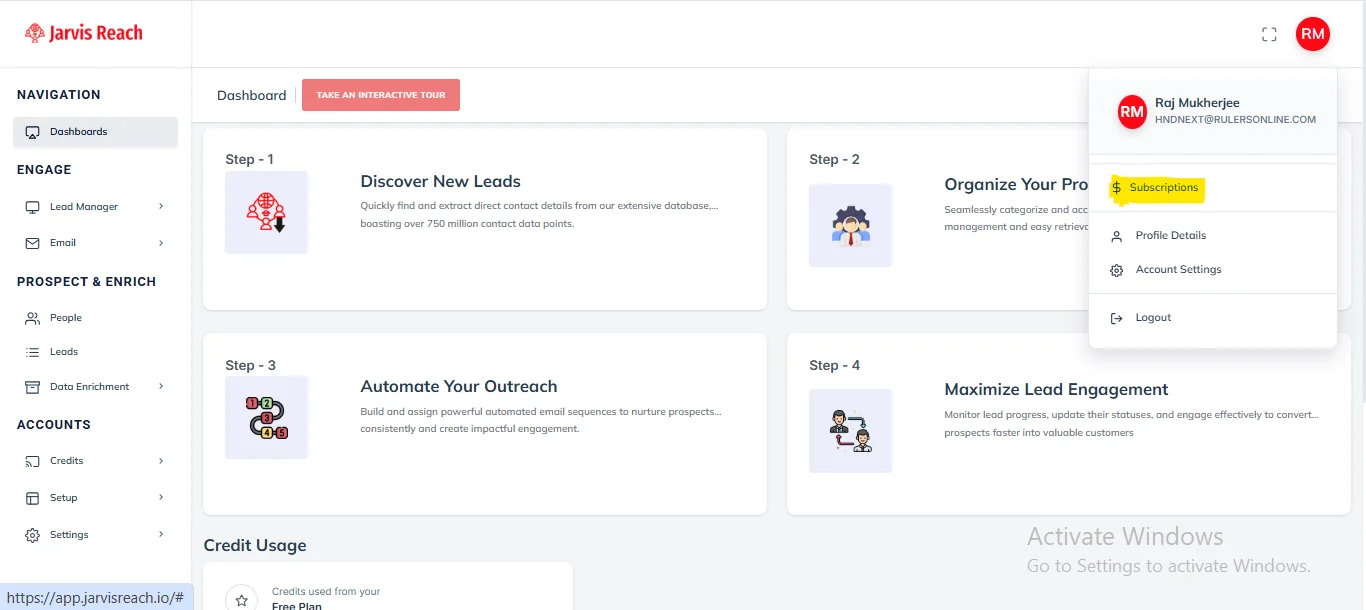
2. Select “Subscription” from the dropdown menu.
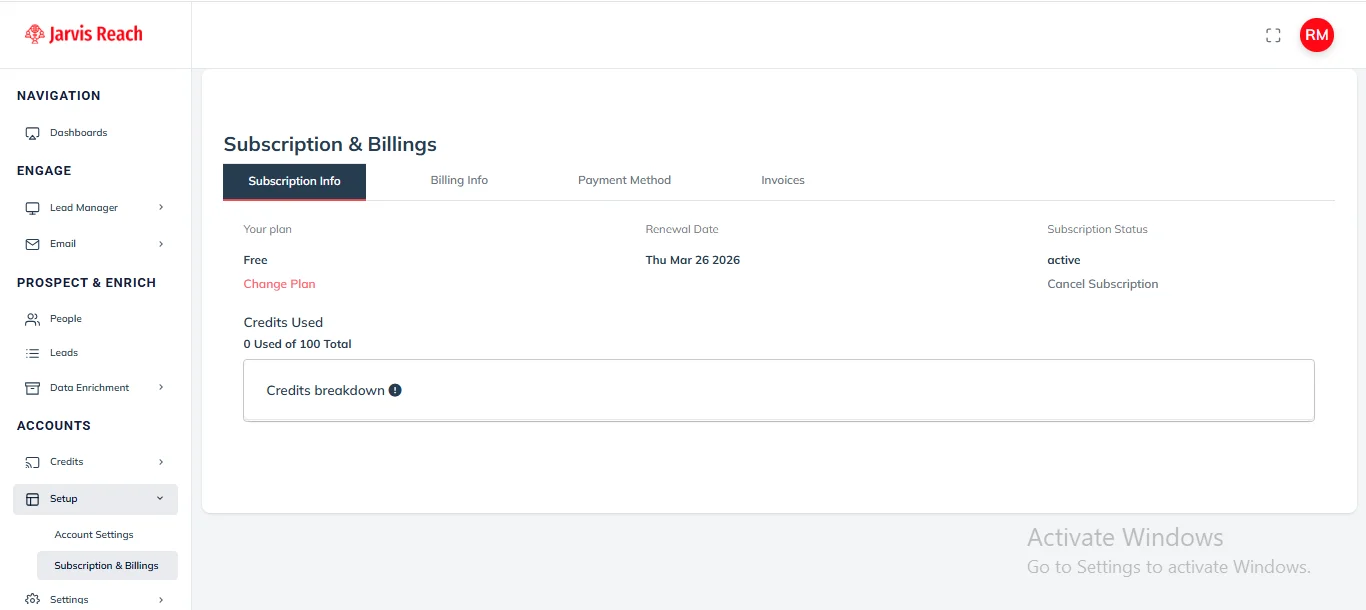
3. In the “Subscription & Billings” tab, you will find details about your current plan, including your next renewal date, subscription status, and credit balance.
How do I add my payment method?
To add your payment details for Jarvis Reach subscriptions:
1. Navigate to the “Subscription & Billings” section, accessible from your profile menu.
2. Click on the “Payment Method” tab or a similar option like “Add Payment” or “Add Card”.
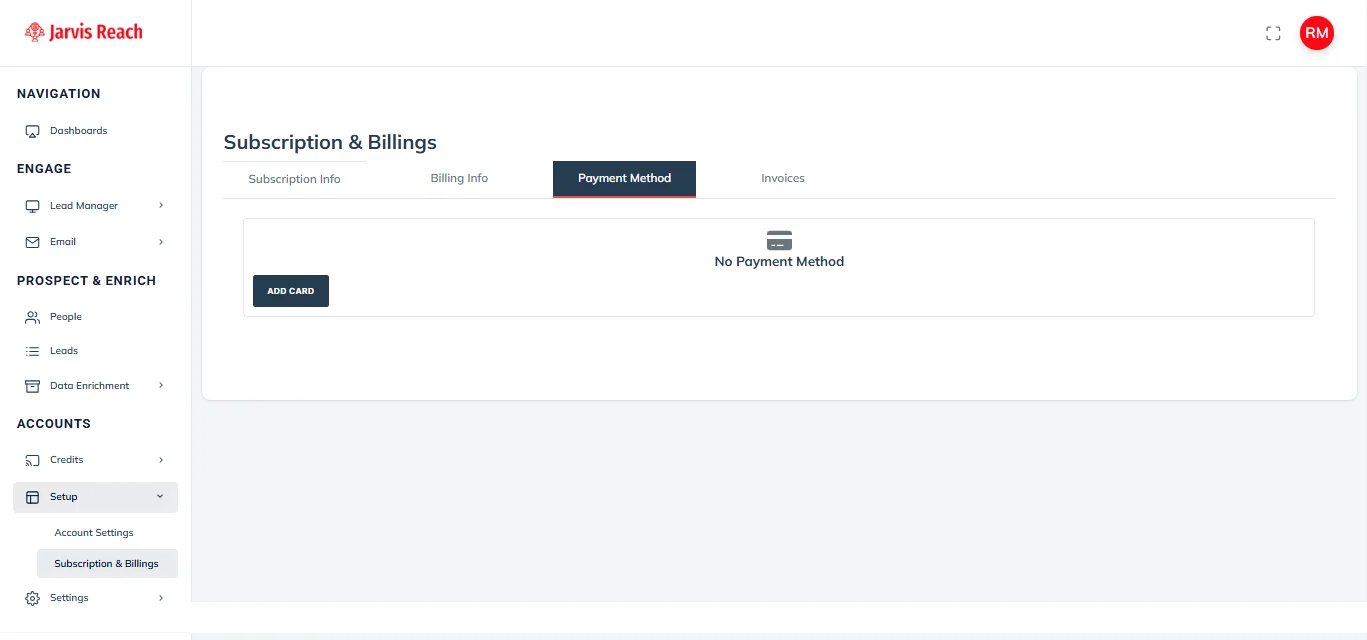
3. Enter the required payment details, such as your card number, expiration date, and CVV.
4. Click “Save” to confirm and securely store your new payment method.
We use secure payment processing through Stripe to protect your information.
How can I update my billing details?
To modify your billing details, such as your address or contact information:
1. Access the “Subscription & Billings” section from your profile menu.
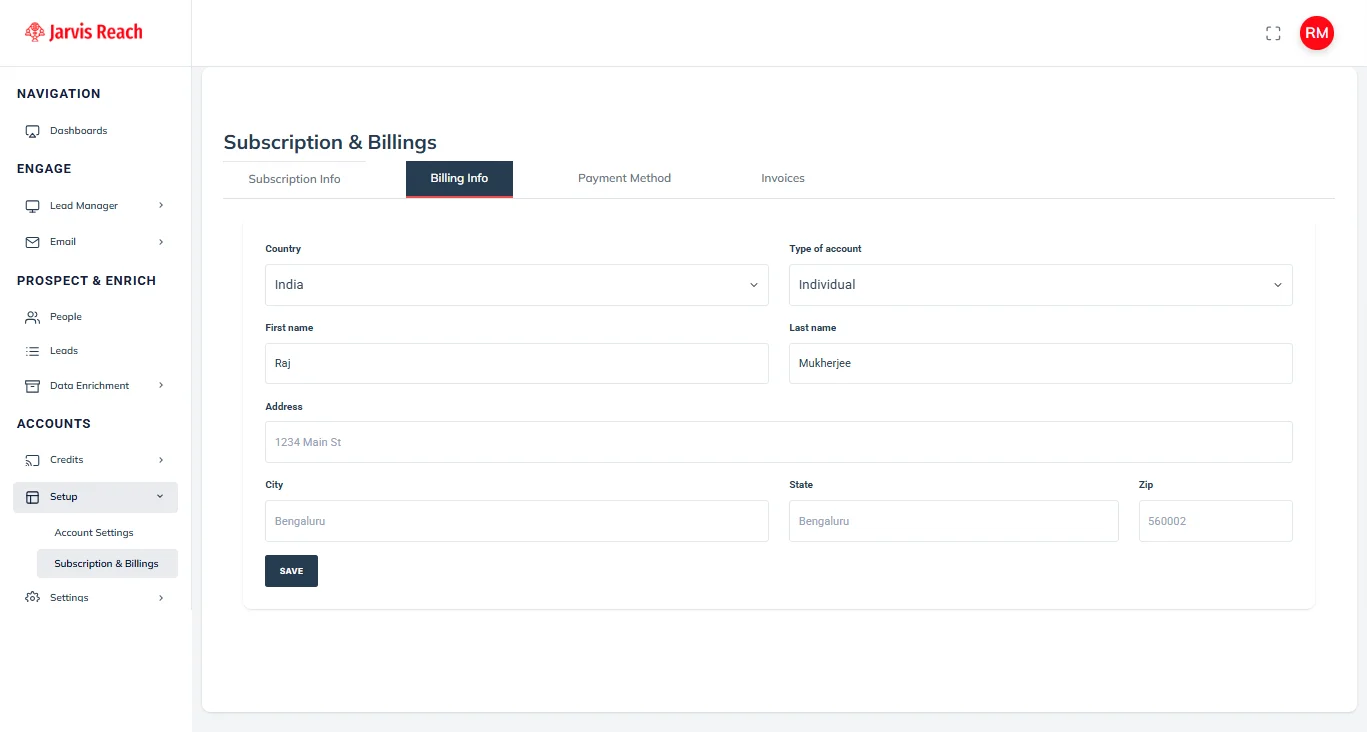
2. Select the “Billing Info” tab.
3. Update the necessary fields, including your country, address, city, state, and ZIP code.
4. Click “Save” to apply the changes to your billing information.
Where can I download my invoices?
To access and download your past invoices for Jarvis Reach:
1. Go to the “Subscription & Billings” section via the profile dropdown.
2. Select the “Invoices” tab.
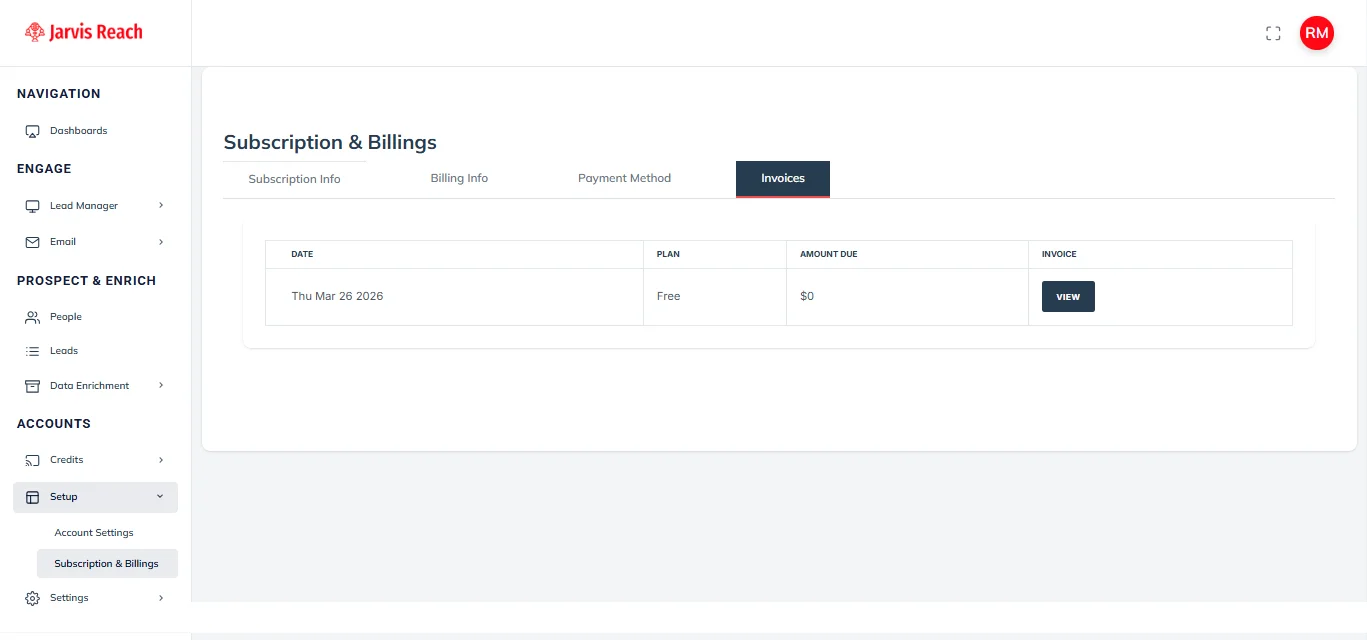
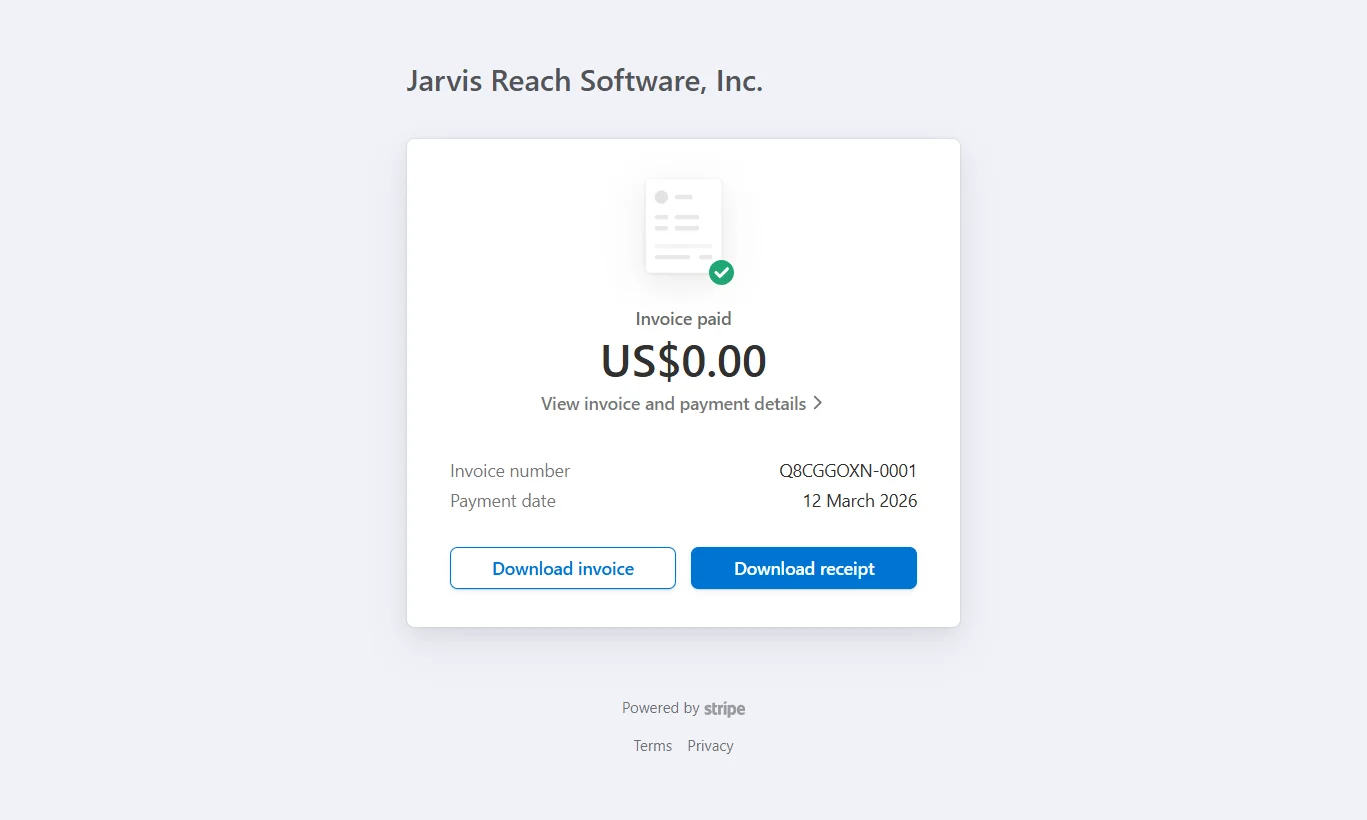
3. Click on “View Invoice” for the specific invoice you wish to download. This will typically open a new page (often a Stripe Invoice), where you can download it as a PDF.
Frequently Asked Questions
How often will I be billed?
You will be billed according to your selected billing cycle, which is either monthly or annually, depending on the plan you chose during signup. Plans and Pricing – Jarvis Reach
Is there a grace period for overdue payments before service is interrupted?
There is no grace period for overdue payments before service is interrupted. Paid users will receive an email reminder to renew their plan one day after it expires.
What payment options are available?
Jarvis Reach accepts major credit and debit cards, processed securely through Stripe.
When can I update my payment details?
You can update your payment details at any time, whether you are upgrading or downgrading your plan or simply updating your payment information.
Is my payment information secure?
Yes, we use industry-standard encryption and secure payment gateways like Stripe to protect your payment information.
You can easily manage your paid subscription within Jarvis Reach.
How Can I Switch to a Different Paid Subscription?
To change your subscription, simply click on ‘Credit > Plan > Choose plan’ for instance, the Advanced Plan.
After the upgrade, your new subscription will become active. Your previous subscription will automatically terminate at the end of its current billing cycle. No further action is required on your part.
Is It Possible to Receive a Prorated Charge?
No, it’s not possible to receive a prorated charge. Each subscription operates independently, and discounts are offered on higher tiers (particularly for semi-annual plans). If you cancel or upgrade, the credits associated with your current subscription remain valid until the end of that subscription period.
What Occurs If I Cancel My Paid Subscription?
If you cancel your paid subscription, it will continue to function fully until the end of its current billing period. After this period, your account will automatically switch to the free plan.
Once your account reverts to the free plan, you’ll no longer be able to export contacts or access phone numbers. Therefore, we advise you to export your complete contact list before your paid subscription terminates.
My Jarvis Reach Workspace Subscription is Past Due
If you’re seeing a warning message on your Jarvis Reach dashboard indicating a payment issue with your account, it means your subscription payment is overdue. This usually happens when our payment system can’t charge the credit card on file for your account’s subscription.
What happened?
Your subscription payment is overdue because our payment system had a problem processing your credit card. When this occurs, specific restrictions are applied to your account until you update your payment information.
What restrictions are applied to the account?
While your subscription is past due, the following limitations will be in effect:
- You won’t be able to use your credits.
- Any assigned follow-up emails will pause.
- Data exports will be temporarily disabled.
How can I resolve this?
To get full access back to your Jarvis Reach account, you need to update your payment method as soon as possible. Once a valid payment method is provided, any outstanding payments will be processed automatically, and all account restrictions will be lifted.
Verify your payment method: Make sure the credit card on file is still valid and has enough funds.
Update your card details: Click the ‘Update Card’ button located under “Subscription & Billings”
If the card is accepted, the overdue subscription will be charged, and your account will be fully unlocked within a few minutes. You can also update your credit card information via the email notification our system sends when a payment issue is detected.
How long will the account restrictions last?
Your account will remain restricted until you renew or upgrade your plan and successfully fulfill the outstanding payment.
Jarvis Reach subscriptions are designed for both power and flexibility. While our plans include automatic renewal at the end of each billing cycle (monthly or semi-annual), we understand that your needs can change. You have complete control to cancel your subscription at any time, ensuring you avoid any unexpected future renewals.
How Do I Cancel an Active Subscription?
Cancelling your Jarvis Reach subscription is a straightforward process:
- Go to the ‘Subscription & Billings’ section on your dashboard.
- Under “Subscription status,” locate and click on ‘Cancel Subscription’.
- Follow the on-screen prompts to confirm your cancellation.
After successful confirmation, your ‘Subscription Status’ will update to ‘Canceled’. Once the cancellation is processed, you can continue to use your remaining credits and features until the very end of your current billing cycle. You will also receive an email confirmation of your cancellation for your records.
Will I Lose My Credits After Cancellation?
No, you won’t lose your credits immediately upon cancellation. Your remaining credits will stay available and fully usable until the end of your current billing cycle. You can always check your subscription expiry and view renewal information in the ‘Subscription & Billings’ section of your profile.
Will I Lose My Contacts or Data?
We understand how crucial your contacts and data are. If you choose to cancel your subscription, all your contacts and extracted data will remain securely stored in your account. You will also retain the ability to export your data and access phone numbers until your active subscription period officially ends. Our priority is to ensure continuous access to your essential information throughout your paid term.
Can I Receive Invoices Automatically via Email?
Yes, absolutely! You will automatically receive an invoice via email immediately after making any payment. For your convenience, you can also download your past invoices anytime from the ‘Subscription & Billings’ section directly within your user dashboard.
Are Refunds Offered for Unused Portions of a Subscription or Mid-Cycle Cancellations?
To ensure complete satisfaction before committing to a plan, we offer 100 free credits with full features included in the Basic plan. We encourage you to utilize this trial period extensively to confirm Jarvis Reach perfectly meets all your needs. Due to the nature of digital data and immediate feature access upon payment, all payments for plans are non-refundable once processed.
For full details regarding our policies, please refer to our comprehensive Terms & Conditions.