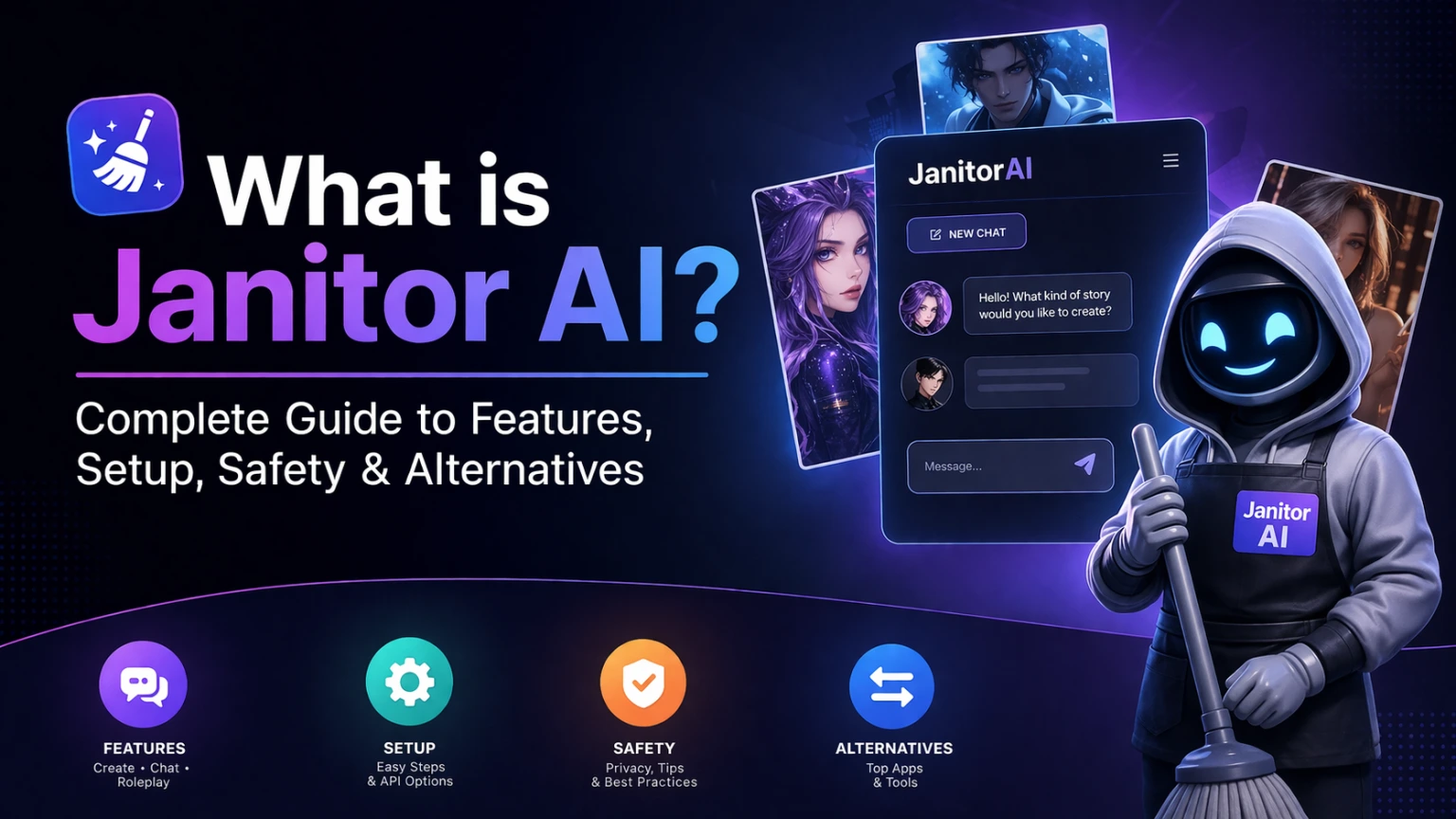
Janitor AI is a free AI chatbot that promises its users an immersive experience by allowing them to create, share, and talk to personalised fictional characters. It was launched by Jan Zoltkowski in June 2023, and it became popular among young adults really fast. Along with role-playing, it offers its users immersive conversational experiences. It took fan fiction to the next level by bringing it to life, adding a conversational dimension. Unlike a standard free AI chatbot that might be very strict about what you can say, Janitor AI is known for its freedom. It hosts a massive variety of user-created characters.
You can do interactive storytelling, romance, or fantasy role play. The official Janitor AI help desk says the site now hosts over 1.4 million public bots. In March 2025 the Janitor team reported 1.4 million daily active users. Today its safety page talks about millions of daily users across every time zone.
Do you need to know coding to use Janitor AI?
The application is very user-friendly, and you don’t have to know anything about coding to make a detailed bot with specific personality traits. The way that Janitor AI functions is by using large language models to create dialogue that is very human-like. Many people use Janitor AI for entertainment and creative writing because the characters feel very responsive during the conversation. Whether you are looking for a specific anime character or a totally original creation, the Janitor AI platform brings those characters to life for you.
Advanced creators can also use Scripts. Scripts is Janitor’s own framework for building triggers and events and lorebooks for characters. You do not need Scripts to start. It is simply there when you want more control.
Is Janitor AI free to use?
A lot of people ask is janitor AI free because they see other platforms charging monthly fees. When it comes to Janitor AI, the website itself is free to access. You can browse the character gallery and set up your profile without paying anything. However, the actual “brain” of the chatbot is what will cost you the money. Because Janitor AI is a front-end interface, it needs to connect to an external API to generate the text.
If you want to use a free AI chatbot experience, you might look for the JanitorLLM which is their built in AI model. That one is usually free for users, but it might have a queue if too many people are online at once. Most people who want the best quality will connect their own API keys. So while the Janitor AI app and site do not charge you a subscription to enter, you might end up paying for the tokens you consume through other providers.
What changed in 2026: Janitor+ and janitor+ Router
On June 24 2026 Janitor launched Janitor+. It is the first paid subscription in the history of the platform. It costs $12.99 per month. Subscribers get 5x more context for better memory. They also get unlimited priority messages and monthly swipes with Janitor’s most powerful models. The Janitor team says the free version stays exactly the same and stays completely free. So is Janitor AI free? Yes. Janitor+ is only an optional upgrade.
On July 30 2026 Janitor added janitor+ Router. Router lets subscribers use third-party AI models inside Janitor without copying API keys or setting up a proxy. You see the price per token before you chat. You pay from a built-in wallet. Right now Router needs a Janitor+ plan and works on the web only.
Since July 15 2026 every user can also choose shorter replies. Open the model settings and set Response Length to Short. Janitor says these short replies are about 70% shorter than standard JLLM replies.
Building Custom Characters from Scratch
One of the main draws of Janitor AI is the ability to build distinct bots from the ground up, like a companion, a gaming NPC, or a unique persona designed to handle specific interactions.
- Start the Setup: Click the Create Character button located in the top-right corner of the main dashboard interface.
- Define the Basics: Upload a clean avatar image that aligns with the platform rules. Assign a distinct character name, choose a chat display name, and draft a short biography. This bio functions as the character card summary that helps other users discover the bot via search filters. Janitor’s own guide says NSFW images are not allowed as bot images.
- Establish Tone and Logic: Use the detailed description fields to dictate how the character speaks, thinks, and reacts. Clear instructions here prevent the bot from breaking character during long chat sessions.
- Add Personality Anchors: Input specific traits, scenario prompts, and example dialogue blocks. External LLMs can help generate these dialogue examples quickly. Once the fields are populated, review the visibility settings (Public or Private) and click Create Character.
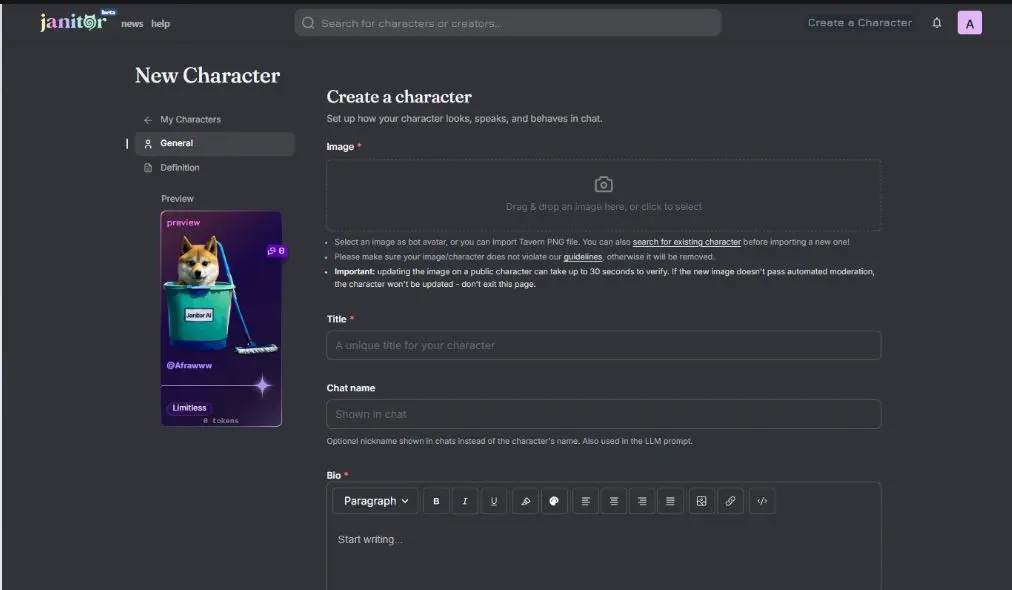
To initiate the first session, click Chat with [Character Name], input a user profile name with a brief appearance description, and begin the conversation.
Two newer creator tools are worth knowing. Save as new lets you copy a character into a fresh version with all its data already filled in. Scheduled releases let you pick a launch date with a public countdown or a silent schedule.
Deleting Messages on Janitor AI
Cleaning up a chat history on this popular free AI chatbot platform takes only a few seconds. Whether accessing the dashboard via a desktop browser or managing chats on the go, here is how to remove specific messages or clear out old text:
- Complete the Janitor AI Log In: Access the main website or official interface, log into the dashboard, and navigate to the active chat list.
- Locate the Target Text: Scroll through the conversation to find the exact message scheduled for removal.
- Trigger the Options Menu: Hover the cursor directly over the message (or tap the text bubble if using a mobile setup). A small icon featuring three dots or a trash can will appear. Since April 2026 these message actions sit in a small footer under each message.
- Confirm and Clear: Select the delete option from the menu. If a confirmation prompt pops up, click “Yes” or “Confirm” to permanently erase the text.
- Refresh the Window: The message should vanish instantly. If a glitch occurs and the text remains visible, a quick browser refresh (Ctrl + R or Cmd + R) will update the chat window.
- Smart Chat Management: Regular maintenance keeps the dashboard loading quickly. For high-value conversations with these talking agents, taking a quick screenshot or exporting the data prior to deletion prevents the accidental loss of good content.
Good to know: Deleting a message no longer touches your Chat Memory. In August 2026 a bug cleared the memory on around 15000 chats when users deleted messages. Janitor fixed the bug and restored those memories. The team says deleting messages will never affect memory again unless you choose to clear it.
Want to delete your whole account? Go to Settings and then Security and then Delete Account. Your account is first deactivated for 30 days. You can sign back in and restore it during that time. After 30 days the deletion is permanent.
Is Janitor AI Appropriate for Kids?
As a parent, there should be some concern about whether your children can use this platform without any risks to their safety. However, the simple answer to that question would be that Janitor AI is certainly not for kids, even though it is often described as a free AI chatbot.
Mature Content:
Despite offering an optional mode that is aimed at limiting mature content, it is very likely that there can still be risks because of the nature of the platform and how open it is to users. Many talking agents created on the platform are not filtered strictly.
Platform Specifics:
In comparison to other platforms, the janitor AI app is meant specifically for adults who wish to write stories. There are no strict restrictions on what kind of narrative it could be, unlike child-friendly AI tools. Its flexible built in AI system allows a wide range of content.
Child Restrictions:
As a parent, it would never be enough to rely only on the restrictions available on this platform after a janitor AI log in. Instead, consider using specialized parental control programs in order to limit your children’s access. Janitor’s own safety page says the platform is for adults only. Any user suspected to be under 18 may be suspended or banned. Users in the UK and Australia and Brazil must also verify their age through a service called k-ID because of local laws.
As a parent, if you wish to learn more or keep track of developments on the site, users often share their experiences on janitor AI reddit or similar customer channel discussions. The official subreddit is r/JanitorAI_Official. Janitor also posts every update on its public changelog at janitorai.com/news.
Understanding SFW and NSFW Modes
The platform divides its ecosystem into two distinct content tiers to accommodate different types of storytelling and user preferences.
Safe for Work (SFW)
This is the default on the Janitor AI app. The app runs in Restricted Mode the first time you open it. This is because Apple and Google have strict app store rules. In this mode NSFW bots do not appear in search or discovery. The AI is also tuned to give safe replies. The website is not bound by app store rules so it uses lighter filtering. Because these interactions run directly on the platform’s own built in AI model, no external API keys are required, meaning is janitor AI free to use out of the box without hidden data costs.
Not Safe for Work (NSFW)
The whole platform is for users aged 18 and older. To unlock NSFW content in the app you must switch it on from the website. Log in at janitorai.com and open Settings and then the Privacy & Display tab. Turn on the switch called Enable NSFW on Mobile. Then close and reopen the app. You cannot change this setting inside the app itself. Activating this mode lifts the standard content filters, opening the door for mature storylines, explicit language, romance, and darker fictional scenarios.
Creators also tag every bot as Limited or Limitless. Limited is for platonic content only such as family or friends or pets. Limitless is for romantic or sexual content. A Limitless tag never makes banned content allowed.
Strict Boundary Enforcement: Even with NSFW mode active, safety boundaries remain non-negotiable. The platform completely bans any content involving minors or the unauthorized depiction of real, identifiable people. The official safety page also lists the glorification of self-harm under its zero-tolerance rules.
Content Saturation and Creative Decline on Janitor AI
On Janitor AI, due to the emergence of numerous user-created bots within a short time span, there has been quite an observable decline in content quality. Although Janitor AI continues to be one of the most popular free AI chatbot applications, its trending area is increasingly populated by repetitive ideas and AI art. These ideas lack novelty and any acknowledgment from those who contributed artistically in creating them, which is being discussed by the community on the janitor AI subreddit. To avoid being caught up in a similar situation, many people have turned towards making talking agents that better suit them with the help of their built-in AI.
Key Issues:
- Repetitive bot concepts (e.g., similar tropes and scenarios)
- Overuse of AI-generated images with little originality
- Lack of proper credit to human artists
- Decline in creative storytelling and uniqueness
- User fatigue highlighted in janitor AI Reddit discussions
Janitor has added tools that help fresh creators get seen. A Creators tab in search recommends smaller creators every day. A Similar characters feature shows bots like the one you are viewing. Creator Verification applications also reopened on July 14 2026. Janitor also has a DMCA process if someone uses your art without permission.
The Limits of Digital Memory: Why Chatbots Forget
If a character begins to lose track of the plot after 50 messages, it is usually due to the context window, the technical limit on how much data an AI can “read” at one time. Because Janitor AI functions primarily as a sophisticated interface for external APIs, it eventually hits a ceiling where older messages are purged to make room for new ones. To maintain a coherent long-term narrative, you must shift your character’s core lore from the volatile chat history into the permanent memory settings. Janitor’s help center says the free JLLM can read about 8k to 9k tokens at once. Janitor+ gives you five times more context.
How to Fix “Memory Loss” (50+ Messages)
Standard memory management on Janitor AI is essentially a “first-in, first-out” system. To bypass this, you need to use Chat Memory (often found in the top right menu of a chat).
- The “Lore Anchoring” Method: Don’t just put lore in the character description. Open the Chat Memory tab and write a concise summary of the current plot and key character facts.
- The Recursive Update: Every 20–30 messages, manually update that Chat Memory. Think of it as a “Previously on…” segment. The Chat Memory panel now has a Summarize since last update button that works for handwritten memory too. There is also a toggle called Memory replaces old messages. Keep it off if you want the bot to see your recent messages plus the memory. Turn it on only if you want to save context space.
- Token Management: If you are using JanitorLLM, keep your Persona under 500 tokens. If your “instructions” are too long, the bot has less “room” to remember the actual conversation. Janitor’s own persona guide gives the same 500 token advice.
- Pinning (The Lore Pin Hack): In your custom prompt (Janitor calls these Advanced Prompts) add a command like: [System Note: Always refer to {{char}}’s status as a ‘Exiled Prince’ and recall the events of the ‘Red Banquet’ in every relevant context.] Janitor raised the custom prompt limit to 500K characters in July 2026.
Janitor AI API settings and pricing
When you go to your Janitor AI log in and look at the settings, you will see a section for API configuration. This is where you decide how much you want to spend. In 2026 the API Settings offer three paths. You can use JanitorLLM or janitor+ Router or your own Proxy. If you use OpenAI the price depends on the model you pick. OpenAI’s current flagship line is GPT-6. On OpenAI’s official pricing page GPT-6 Sol costs $2 per million input tokens and $10 per million output tokens.
GPT-6 Luna is the budget model at $0.10 input and $0.50 output per million tokens. Bigger models cost more but the talking agents feel much more realistic. You have to monitor your usage closely so you do not get a surprise bill at the end of the month. Many users on janitor AI reddit suggest starting with cheaper models to see if you like the character before moving to the high end ones.
Janitor AI API Model Configuration and Pricing Comparison
| Model Provider | Best For | Official Price (September 2026) | Free Option Availability | Key Features |
| JanitorLLM | General roleplay | $0.00 | Yes | Built-in AI, internal use with about 8k to 9k tokens of context |
| Janitor+ (JLLM+) | Better memory and faster replies | $12.99 per month | No | 5x context and priority messages and swipes with frontier models |
| janitor+ Router | Premium third-party models without a proxy | Pay per token at the prices shown in settings | No (needs Janitor+) | No API keys needed and web only for now |
| Kobold AI | Privacy and local use | $0.00 | Yes | Privacy-focused, requires local hardware |
| OpenAI (GPT-6 Sol) | Deep and complex stories | $2 input and $10 output per 1M tokens | No | High realism and deep storytelling and pay-per-token |
| OpenAI (GPT-6 Luna) | Fast and basic chat | $0.10 input and $0.50 output per 1M tokens | No | Budget-friendly and requires API credits |
| DeepSeek | Logic and instructions | Very low cost | Limited (free model variants on OpenRouter) | High logic capabilities, budget-friendly |
Prices change often. Always check the official OpenAI and DeepSeek pricing pages before you add credits. DeepSeek now uses different prices for peak and off-peak hours.
Janitor AI Security Concerns for Business
However, if you are interested in the safety of using Janitor AI for your business purposes, the response is no; the application cannot be considered safe for business use. This is due to the fact that the service is created for consumers’ amusement and not designed for enterprises.
Data Security:
The issue here is that since the application sends all the conversation data to third-party sources, Janitor AI does not meet the requirements for data security and confidentiality.
Technical Infrastructure:
Unlike other professional solutions, Janitor AI has nothing like this in its technical infrastructure. Even features like how to set up DeepSeek on Janitor AI do not make it enterprise-ready.
How to install the Kobold AI API for Janitor AI
If you want to keep your costs down, you might want to learn how to install the Kobold AI API for Janitor AI. Kobold is a great alternative because it can be run locally on your own computer if you have a good graphics card. This makes it a free ai chatbot setup in the long run. To do this, you need to run the Kobold backend and then copy the API URL into your Janitor AI login settings. It is a bit more technical than just using a built in ai, but it gives you much more privacy. It is a favorite method for the technical crowd on the janitor AI Reddit community.
Here are the basic steps to get it running:
- Download KoboldCPP: Go to the official GitHub and download the latest version. This is the “brain” that will host your free ai chatbot locally.
- Pick a Model: You will need a GGUF format model (like Llama or Mistral). You can find these on Hugging Face. Look for ones that the Janitor AI Reddit users recommend for roleplay.
- Launch the Backend: Open KoboldCPP and select your model. Make sure you check the box for “Remote Tunnel” or “Cloudflare” if you want to use it on the Janitor AI app while away from your desk.
- Copy the API Link: Once it starts running, Kobold will give you a local or tunnel URL. It usually looks like a string of random numbers and letters ending in .trycloudflare.com.
- Configure Janitor AI: Log in to your Janitor AI login account, click on “API Settings,” and open the Proxy section. Click Add Configuration. KoboldCPP offers an OpenAI-compatible endpoint. So paste your tunnel link with /v1/chat/completions added at the end into the Proxy URL field. Type any model name and any text in the API key field if the form asks for one.
- Test the Connection: Save the settings and try chatting with one of your talking agents. Refresh the page after saving because Janitor needs a reload when the proxy URL changes. If the text starts appearing, you have successfully bypassed the need for expensive third-party tokens.
By following these steps the AI model runs on your own computer. No outside API company sees your chats and it costs you nothing but electricity. Your chats are still saved on Janitor’s servers though. It is a bit of a hurdle at first. Once you learn it and also learn how to set up DeepSeek on Janitor AI you will have both a free local option and a cheap cloud option.
What is the OpenAI reverse proxy for Janitor AI?
Sometimes you will hear about an OpenAI reverse proxy. This is basically a middleman server that people use to access OpenAI models. Some people might be using this application because they want to avoid some restrictions or because they want to use a shared key. However, you have to be careful with this application. Using a proxy with the Janitor AI is dangerous because the person using the proxy might be able to read your messages.
It is usually better to use the Janitor AI built in AI or your own official keys to stay safe. Janitor now also offers its own official option called janitor+ Router. It gives you premium models without sending your messages through a stranger’s shared proxy.
How do you use Janitor AI?
To get started with this platform, you first need to go through the Janitor AI login process on their official website. Once inside, you can surf through the thousands of unique characters created by the community. If you find a character or application you like, you can just click on it and start typing right away. The system is intended to be extremely easy to use, and you don’t have to be a tech guru to use it. You can sign in with email or with Google or Apple or Discord or X. The account settings also show every active session so you can sign out of old devices.
Creating Your Own Custom Bot
If you wish to create your own bot, as opposed to using someone else’s creations, you will have to go to the “Create Character” tab. This is where the real fun begins. You have to give your bot a name, a detailed description, and some initial dialogue so that these talking agents know exactly how they have to behave during a conversation. Many users on the Janitor AI Reddit suggest spending a lot of time on the “Definition” section to make sure the built in ai understands the personality you are going for. It is almost like being a director of a small digital play.
Janitor AI: Update on Features and Capabilities
When you perform a Janitor AI log in, you aren’t just accessing a free AI chatbot; you’re stepping into a modular ecosystem. While some critics argue it’s just a “wrapper,” the platform’s 2026 evolution has introduced built-in AI features that rival standalone platforms. For those looking for talking agents that don’t break character, learning how to set up DeepSeek on Janitor AI is the ultimate power move, giving you “pro-level” reasoning without the high cost.
While the Janitor AI Reddit community often debates if it’s safe for business, the platform has improved its customer channel support with a full help desk at help.janitorai.com. Its privacy policy says it encrypts data in transit with HTTPS. Whether you use the Janitor AI app or the browser version, the flexibility remains unmatched. It stays true to the “Bring Your Own Key” philosophy, ensuring that if you want a smarter bot, you simply plug in a smarter brain.
Key Highlights:
- Is Janitor AI free? Yes, the base UI and JLLM remain free, though premium API keys (like Claude or GPT-4) cost extra. Janitor+ is an optional $12.99 monthly plan for more memory and faster replies.
- DeepSeek Integration: Janitor’s own help center uses DeepSeek through OpenRouter as its quick-start proxy example. That makes it one of the most common high-logic choices for roleplay.
- Official App: The official Janitor AI app entered public beta on February 7 2026 on the App Store and Google Play. The publisher is Janitor AI Inc on both stores. Janitor warned users about fake apps so only download from the official links.
- JLLM Upgrades: In April 2026 Janitor moved JLLM to a new base model to improve logic. In July 2026 it shipped a fix that cut repeated phrases in its tests.
Using the Janitor AI app on the go
You can also use the janitor AI app if you prefer being on your phone or tablet. The janitor AI app allows you to continue with your stories and conversations even when you are away from your computer. This flexibility is a big reason why it has become such a popular free AI chatbot for creative writers. You just need to ensure your API settings are synced across your devices so the talking agents do not lose their “memory” of your previous chats.
In May 2026 the app merged API Settings and Generation Settings and Generation Rules into one Model Settings menu. To see NSFW content in the app you must turn on Enable NSFW on Mobile from the website.
How to set up DeepSeek on Janitor AI
If you are interested in knowing how to set up DeepSeek on Janitor AI, you will have to find a provider that hosts the DeepSeek model—such as OpenRouter—and procure an API key from them. Then, just paste that key into the custom API section of your Janitor AI login settings. This gives you a very powerful model at a low cost. OpenRouter also lists some free model variants that end in :free. These free variants are capped at 50 requests per day. The cap rises to 1000 requests per day once you have bought at least $10 in credits. It is known for having a very high logic score, making the interactions feel much more grounded.
Step by step (based on Janitor’s official help guide):
- Sign up for free at openrouter.ai.
- Open your profile and go to Keys. Create a key and save it somewhere safe.
- Log in at janitorai.com and open any chat.
- Open the menu and go to API Settings. Choose Proxy and click Add Configuration.
- Paste the exact DeepSeek model name from its OpenRouter model page. Model names change often so always copy the current one.
- Use https://openrouter.ai/api/v1/chat/completions as the Proxy URL.
- Paste your API key with no extra spaces.
- Save your settings and refresh the page. Then send a test message.
Why Is Janitor AI Not Working? Common Issues
It is very common to find people complaining about how Janitor AI is down or is not responding properly. However, the most probable reason for this problem is simply that the server is overloaded. This is because it being a very popular free AI chatbot, there are thousands of people who wish to use this service at exactly the same time. Janitor’s own changelog confirms this. On September 11 2026 the team posted that the site was very unstable while it upgraded servers.
Common Fixes
If you are stuck and cannot get your talking agents to respond, here is a quick checklist of things to try before you give up:
- Check the status page: Check if there is actually a global outage for the backend or frontend. The official status page is status.janitorai.com. You can also read the changelog at janitorai.com/news/changelog.
- Visit the janitor AI Reddit: This is the best place to see if other people face the same problem in real-time.
- Refresh and Wait: Sometimes a simple page refresh is all you need to get past a temporary server hiccup.
- Clear your cache: Outdated browser data can sometimes break the janitor ai app interface.
- Toggle your VPN: Sometimes your connection to the Janitor server or API provider is being throttled by your local network.
Understanding the “Load Failed” Error
Another frequent issue is the “Load Failed” error. This usually means your API key has run out of credits or the connection to the server of the API provider is blocked. If you are using an external provider like OpenAI or OpenRouter, you have to ensure your billing is up to date. Even a free ai chatbot setup can fail if the bridge between the site and the “brain” of the AI is broken. OpenRouter says a negative balance can cause errors even on its free models.
Troubleshooting DeepSeek and API Settings
If you are trying to learn how to set up DeepSeek on Janitor AI and it is not working, you should double-check that your API URL is absolutely correct. A single extra slash or a typo in the link will prevent the built in AI from communicating with the model. Many users on the Janitor AI Reddit suggest generating a fresh API key if you keep getting authentication errors. If your saved proxy settings disappear use the Recover button in the proxy settings panel.
You will need to type your API key again because Janitor never stores keys in history. If you use DeepSeek’s own API also check the model name. DeepSeek retired its old deepseek-chat and deepseek-reasoner names in July 2026.
Learn how expert teams build, test, and deploy AI agents at scale
While Janitor AI is great for fun, businesses need something more professional. Jarvis Reach provides these services and helps companies manage their communication much better than a simple role play bot. If you want to see how real automation works, you should visit Jarvis Reach to see their tools. Jarvis Reach is actually safe for business because it focuses on lead generation and professional outreach rather than fictional characters. They help you build talking agents that actually help your customer channel grow.
Is Janitor AI safe to use?
The question of safety is a big one for any free AI chatbot user. Is Janitor AI free of risks? Not entirely. Since it is an NSFW platform, it is definitely not for kids. You must be at least 18 years old to use these talking agents. When you complete your janitor AI login, you are entering a space with a lot of adult content, so you have to be careful about what you encounter.
Age verification and content moderation
To keep the platform safe for business and general users, Janitor AI has a zero-tolerance policy for any content involving minors. Janitor says AI tools trained on its Content Policy screen every piece of content before it is published. Full-time human moderators review reported content around the clock. The safety page reports more than 20K human moderation actions every month. Even though it is a free AI chatbot, they take these rules seriously to avoid legal issues. If you are browsing the Janitor AI app or site, you will see bots tagged “Limitless” for romantic or sexual content and “Limited” for platonic content only.
Data privacy and chat logging
As for the issue of data privacy, Janitor AI says that they are trying to keep things private for every customer channel. However, you should never share any real personal information with any chatbot. These bots are just machines, but the data is stored on servers. If you look at the janitor ai reddit, you will see many discussions about how data is handled. It is not exactly a vault for secrets.
Janitor’s safety page says it never sells your personal data. It also says it never shares private chats with third parties for advertising. Its privacy policy still allows sharing with service providers and for legal requests. Support and security staff may also access account data to look into abuse.
For professional needs, Jarvis Reach provides these services with enterprise-grade security that Janitor AI simply does not offer. You should visit Jarvis Reach to handle your actual business communication and keep Janitor AI only for your creative hobbies.
Risks of third-party API connections
If you want a more custom setup, learning how to set up DeepSeek on Janitor AI or using the built in ai on the Janitor AI app can offer different levels of control. But remember, when you use an external API like OpenAI, your data leaves Janitor’s servers and goes to another company. This “data chain” is why many users on the Janitor AI Reddit warn against putting sensitive info into the chat. The rule remains the same: do not treat an entertainment bot like a secure, private document.
Tips for Parents on How to Maintain Safety
If your teen is accessing these AI technologies, including the janitor AI app or any free AI chatbot, you cannot sit back. There should be active participation as well as the use of a filter.
- Limit Screen Time: Regardless of whether there is filtering or whether is janitor AI free, too much time spent on the internet can harm your child. Use features available in devices to limit the amount of time your child spends on an AI app.
- Use Parental Control Software: Downloading software that can monitor how your child uses apps and filter the websites will provide an added security feature.
- Dialogue: Discuss the hazards of conversing with an AI program with your children. Inform them that AI is not human, but a technology, and anything that your child reveals to the program can be logged.
- Review: In case you find the AI systems that your kids use satisfactory, then take a few moments to review the situation regularly.
- Privacy: It is essential that your kids learn never to give away personal details like the contacts they make or places they visit, even to AI agents.
- Report It: If you think a minor is using Janitor you can report it. Email support@janitorai.com or use the Report button on any character or comment.
Security, Privacy, and Advanced Model Setup
The platform keeps IP addresses, personal details, and chat histories private by default. While users can choose to make specific chats public, all conversations start as strictly confidential. Public chats launched on March 31 2026. Other users can read and react to and fork any chat you publish. However, security and operational stability depend heavily on how the backend engine is configured.
Enterprise and API Ban Risks
When evaluating whether the platform is safe for business or professional deployment, organizations must look closely at data handling:
- Third-Party API Vulnerabilities: Connecting external LLMs requires strict compliance with their corporate use policies. Standard commercial providers heavily restrict the generation of explicit or unmoderated content through their endpoints.
- Account Bans: Violating these external terms often triggers automated system bans, cutting off API access entirely.
- Risk Mitigation: A proxy does not remove a provider’s rules. The provider’s usage policy still applies to every request you send. The safest path is to pick a model whose terms allow your type of content. Janitor’s own JLLM or janitor+ Router avoid this problem for most users.
Practical Layouts and Use Cases
The flexibility of deploying conversational models extends far beyond simple text entertainment, adapting well to mobile optimization via a progressive web janitor AI app layout.
Rapid Prototyping in E-Commerce
A boutique online store needed a multilingual support assistant to handle basic customer inquiries. Instead of coding a system from scratch, the development team built a prototype overnight. Testing the conversation flows inside the platform allowed them to launch a functional chatbot on their live customer channel 70% faster than traditional development timelines.
Creative Writing and Voice Design
An independent novelist utilized the character creation tool as an interactive sounding board to develop distinct dialogue voices for an upcoming portfolio. By interacting with the bots, the author could test how different personalities responded to tension. The final chat dynamics were exported directly into JSON format and moved into offline writing software like Scrivener for final book editing.
Why does everyone prefer Janitor AI over Character AI?
| Platform Name | Character AI | Janitor AI |
| Content Policy | Strong filters with limited NSFW or explicit content; designed for a moderated experience. | Minimal filtering allowing for adult and uncensored roleplay; it depends on the connected API. |
| Setup Complexity | Very Low; users can sign up and start chatting immediately. | Low with the free JLLM. It becomes higher only if you connect your own API key or proxy. |
| Customisation Depth | Limited; offers easy character creation but lacks deep control over AI behaviour. | High; allows tweaking of prompts, memory, and specific model settings. |
| Primary Target Audience | Casual users, fans of storytelling, and fandom chats. | Advanced users seeking roleplay freedom or experimentation. |
| AI Model Architecture | Proprietary; uses internal closed-source models. | Hybrid. It runs its own JLLM model and can also connect to external AI models through a proxy or janitor+ Router. |
| Ideal Use Case | Safe, easy-to-use personality-driven chats and casual storytelling. | Uncensored roleplay and scenarios requiring high user freedom and control. |
What are some Janitor AI alternatives?
If you are currently finding that Janitor AI is not working for you, there are several other paths you can take to keep your stories moving. Here is a breakdown of the best options for a free ai chatbot experience:
- Character AI: This is probably the most famous choice, but it has a very strict filter that many creators find frustrating. This is exactly why the janitor ai reddit stays so active with people searching for more freedom.
- SillyTavern: This is a powerful interface, though it is a bit more complex to set up than the standard janitor ai app. It is perfect if you want total control over your talking agents.
- SpicyChat: Another popular free ai chatbot that offers a more open experience for those who want to avoid the heavy filtering found elsewhere.
- DeepSeek Integration: If you are looking for better reliability, many users suggest learning how to set up deepseek on janitor ai. This model is particularly excellent at following complex instructions within the built in ai settings.
- Jarvis Reach: While Janitor is for fiction, if you need something safe for business, Jarvis Reach provides these services to help you manage a professional customer channel. You can visit Jarvis Reach to see how they handle automation at scale.
No matter which platform you pick, always check the janitor ai reddit or community boards to see if the servers or API connections are currently stable before you start your next big project.
Janitor AI vs. 2026 Rivals
| Feature | Janitor AI | Venus AI | Candy.AI |
| Model Source | JLLM (free) plus janitor+ Router or your own proxy (BYOK) | External API focus | Proprietary Models |
| Memory Tech | Chat Memory with manual or auto summary (5x context on Janitor+) | Vector Database Sync | Dynamic “Long-Term” |
| Stability | Mixed. Janitor logged outages and slowdowns as recently as September 2026 | Moderate (Cloudflare loops) | High (Closed system) |
| Privacy | Middle (Depends on Key) | High (Self-hosted options) | Low (Data tracking) |
Conclusion
Janitor AI is a top choice for creative freedom, especially if you want a free ai chatbot without strict filters. Its best features include deep character customization and the ability to use the built in ai or learn how to set up deepseek on janitor ai for better logic. In 2026 it also added Janitor+ for better memory and janitor+ Router for easy access to premium models. However, the downside is occasional server lag on the janitor ai app and privacy risks, as it is not safe for business data.
While it is great for hobbies, Jarvis Reach provides these services for professional needs by offering a massive B2B database and email verification. You should visit Jarvis Reach to manage a secure customer channel and scale your outreach without delay.
FAQ
1. What do people use Janitor AI for?
For testing dialogues, story twists, and character relationships, consider using Janitor AI. For roleplay enthusiasts, Janitor AI offers the option of generating prolonged conversations either with custom or fan-made characters.
2. Is Janitor AI safe to use?
In general, Janitor AI is safe to use for casual purposes by adults. It says it never sells your data. You can delete your account from Settings with a 30-day restore window. Still it is not built for sensitive or business data.
3. Can people see your chats on Janitor AI?
Other users cannot see your chats unless you choose to publish them as public chats. Janitor says it never shares private chats with third parties for advertising. Its staff may access data to investigate abuse or answer legal requests. If you use an outside API or proxy that provider can also see your messages.
4. What is the age rating for janitor AI?
Janitor AI is for adults aged 18 and older only. Any user suspected to be under 18 may be suspended or banned. Users in the UK and Australia and Brazil must pass an age check through k-ID.
5. Is Janitor AI unlimited messages?
Certainly, Janitor AI has unlimited messaging; however, the number of messages you can send depends on the LLM used:
- JanitorLLM (JLLM): The native AI model from the JanitorAI service is available for free and has unlimited messages. Nevertheless, it is limited by the amount of memory available for it, which means that the oldest messages will start disappearing when the chat grows.
- Janitor+: The $12.99 monthly plan adds unlimited priority messages and 5x more memory.
- Paid API Models (OpenAI, Claude, etc.): In case you want to use additional API models, you are going to be charged per message and tokens; some models have limitations related to the number of credits used.
6. Is Janitor AI private?
As for the issue of data privacy, Janitor AI says that they are trying to keep things private for every customer channel. However, you should never share any real personal information with any chatbot.
7. Is Janitor AI better than cai?
More than whether Janitor AI is better than cai, you should be looking for in the platform. If it is more aligned towards having Strong filters with limited NSFW or explicit content, then you can go for cai, and on the other hand, for Minimal filtering allowing for adult and uncensored roleplay, depending on the connected API, then Janitor ai is the one.
8. What is Janitor+ and is it worth it?
Janitor+ is the first paid plan from Janitor AI. It launched on June 24 2026 at $12.99 per month. It is worth it if you use the free JLLM a lot and want better memory without setting up a proxy. If you already pay for your own API key you may not need it.
9. Is there an official Janitor AI app?
Yes. The official app is on the App Store and Google Play. The publisher is Janitor AI Inc. The app is free to download and starts in Restricted Mode by default.