Find email address for free using Google, LinkedIn, company websites, and AI search. If you have a name and company domain, you can look into the company’s email format. The main task is finding the right result from an outdated list or incorrect guess. This guide sets out where to look, what to check, and what to try. Usually finding an email address takes a lot of time and let you frustrated. The reason is that you try all methods that are listed everywhere. That’s why we researched, tried a lot of methods, and brought the best working ones here. Come dive in and thank us later; you may not know how much time you will save from here.
How to Find an Email Address for Free
To find email address for free, there are free email finder methods. So, let’s begin with the starting point. Start with the data that you already know. To make things simpler, check the table given below. You do not need to try each and every method. Check what you have, record what you find, and verify email address.
| What you have | Where to start | What to check |
| Name and company | Check whether it’s the right person. Do they currently work here? | |
| LinkedIn profile | Contact Info and visible links | Address visibility and source context |
| Company domain | Company website | Direct address versus company inbox |
| Limited public information | AI search | Check whether it has an original source. |
| An observed employee address | Email-pattern research | Candidate versus confirmed finding |
| Several contacts to research | Free-credit finder | Access requirements and usage limits |
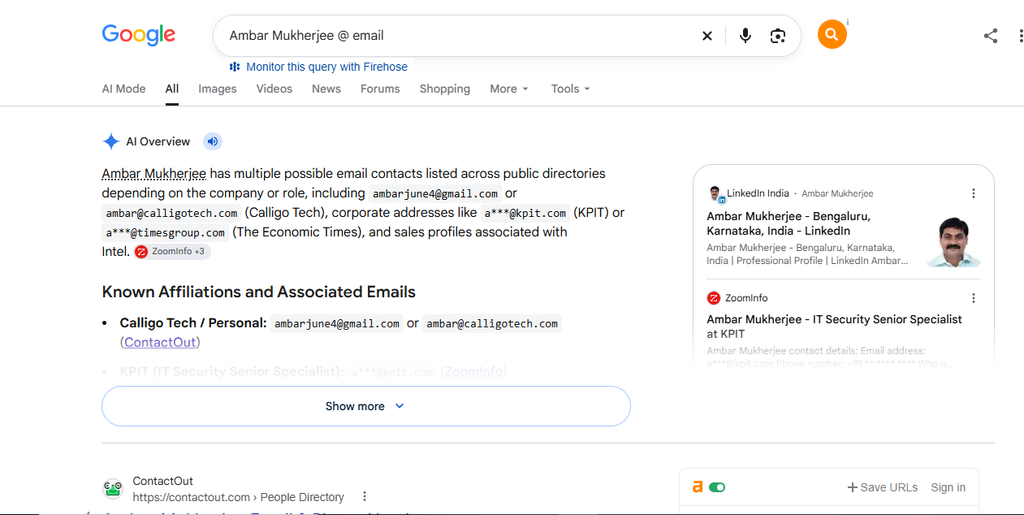
Search in Google using the person’s name and company
Searching just a name in Google may not end with right profles. Add the current company to filter your email address search before trying more complicated queries.
Start with
“Full Name,” “Company Name,” email
Then try
“Full Name” @ email
Check employee bios, conference pages, press releases, and public documents. Open each source to confirm the email address. Do not rely on search snippets alone. Check the original page and confirm whom the address describes.
In our test to find email address, Google produced useful findings. The important step was inspecting the source. We did not treat the search result itself as proof. If nothing appears, then continue with other methods.
Check LinkedIn for Contact Details
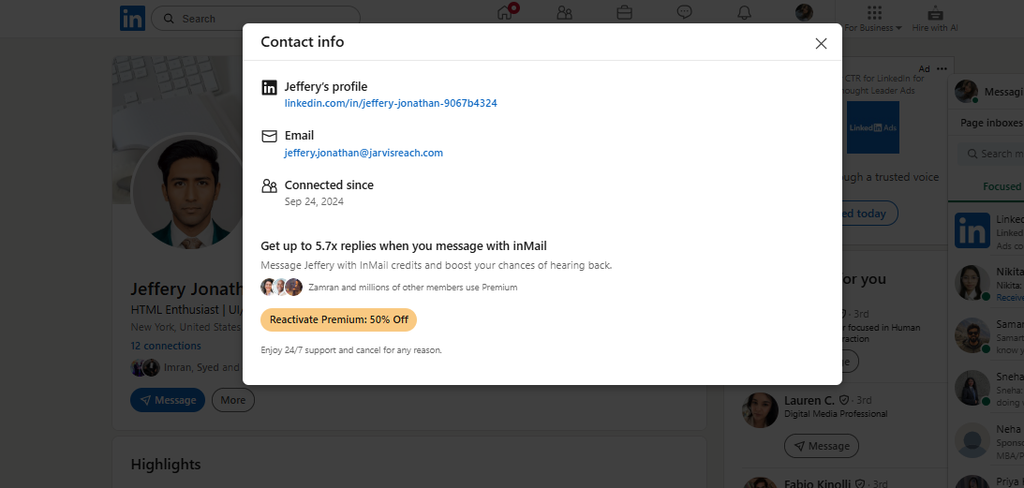
Finding email address on LinkedIn is a 2-step process.
1- Go to their profile.
2- Click contact info.
Here you may find email address. But in some cases, you can’t see the email address. Don’t think that the profile is now a waste. You have another opportunity here. Use the confirmed name, company, and website in another method. This may happen because of the person’s visibility settings and your connection status.
Record whether you were connected to that person before checking info. Don’t assume that every reader will see the same information.
LinkedIn produced a useful result in our finding email address test. We tested a few people on LinkedIn, and we got the email address from their profile.
Search the Company Website
A company website may list a phone number, support inbox, or community link without revealing an employee’s direct email. That was part of our experience, and it is an important point: finding a company contact route is not the same as finding email address of someone.
Check these pages first:
- Contact.
- Team or leadership.
- Blog author profiles.
- Press or media.
- Relevant company announcements.
Look for an address explicitly associated with the person. If you find only hello@, info@, or a support inbox, record it as a generic company address.
Do not assign that inbox to an individual simply because they work there. Also, a Discord link or phone number is an alternative contact route. It is not an email discovery.
In our test to find email address, we found the direct email address from author description. While testing other people, we found the company email address. So, when the website offers no direct address, keep the generic inbox for an introduction request and continue with another method.
Use AI Search to Find Publicly Available Email Addresses
AI search can help you find public sources you missed. But a confident answer is not sufficient evidence. A useful result is a source that actually connects an address to the target person.
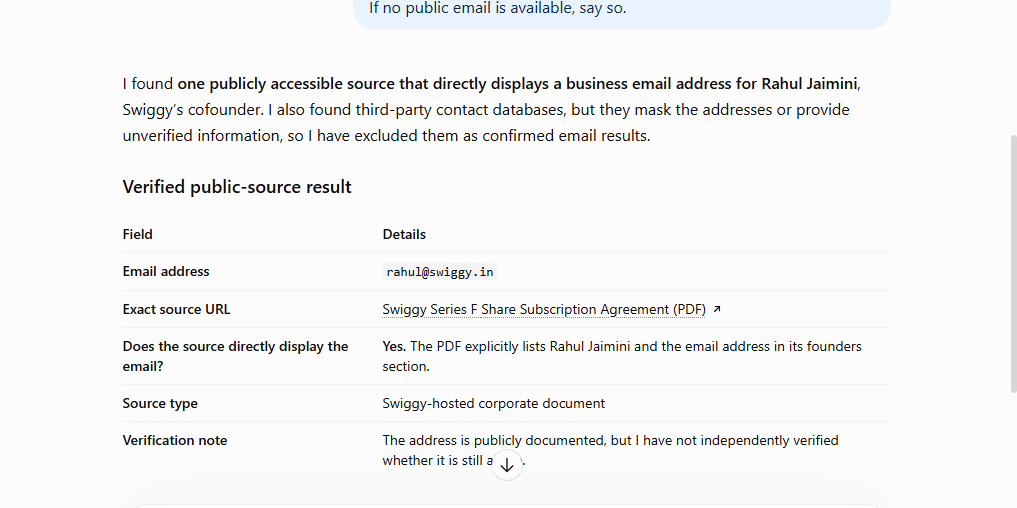
Paste this prompt with the required information, and you will find email address with original source. Open each supporting page. Confirm the name, company, and address rather than accepting the AI’s summary.
Prompt:
Find publicly available business email addresses for [Full Name], [Job Title] at [Company].
Use only public sources such as the company website, press pages, conference speaker pages,
podcast pages, blog author pages, LinkedIn, and social profiles.
For every result, provide:
1. The email address
2. The exact source URL
3. Whether the source directly displays the email
Do not guess, infer, or fabricate an email address.
If no public email is available, say so.
AI search worked in our test of finding email address. For your own research, also note whether it discovered a new source or simply rediscovered information already found through Google.
An unsupported “likely email” belongs in your candidate list, but it is not your confirmed findings.
If you are going to find email address in bulk, try using this AI. This AI automation makes your work simple.
Linkfinder AI:
Linkfinder AI is a email lookup extension AI. You can add it in simple steps.
- You just have to add the extension.
- Open any spreadsheet.
- Go to the add-on
- Click extension
Now you have to add just 3 infos.
- What are you looking for?
Eg: finding emails from LinkedIn
- Where to read from?
- Where to put the answer?
Paste the LinkedIn profile URL, click “Enrich Profile,” and the verified email appears. This AI does not guess any email. It verifies and sends from the mail server. If it can’t find, the AI will say, “No data found,” rather than guessing.
Note:
This AI is currently not available in a few countries, so check whether this free email finder is working in your country first.
Check X Profiles and Public Posts
X can be a supplementary source when someone publicly shares professional contact information. It is less useful when the person has little activity or does not publish an address. In that case, you may not be able to find email address in X.
For this you can use X Advanced Search.
Add the handle name and @email. Click Advanced search. Posts will start appearing with email if they mentioned email; if not it will not come.
First, confirm the correct handle. You can even check the bio, linked website, and relevant public posts.
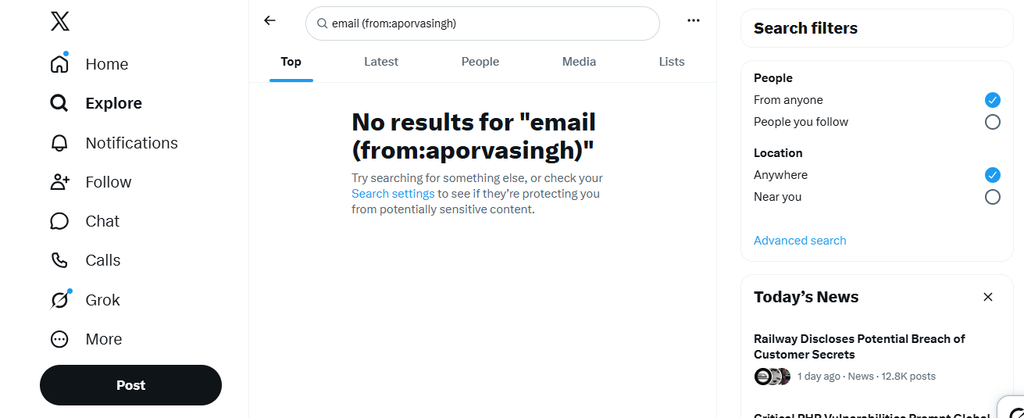
Our X searches did not produce a direct email in the test. We recorded that outcome rather than repeatedly changing queries until something looked convincing.
If the profile and a few searches do not help, try another method. The search may have failed, but the person could still have an email address.
Check Personal Websites and Newsletters
Some professionals provide contact details on a personal website. Follow website links from known professional profiles. Check Contact, About, Portfolio, or “Work with me” pages. Look for an address linked with the relevant professional activity.
You can find email address of someone from newsletters. If the person posts a newsletter, try subscribing it and you will receive their newsletter from their email ID.
The newsletter worked for us in our test on finding email address. But we were not able to find portfolios, or contact pages.
If no relevant website or newsletter exists, skip this method. The main aim is finding reliable evidence.
What to Do If You Cannot Find a Direct Email Address
Sometimes public research does not reveal a reliable direct address. That is not a reason to present a guess as fact or continue looking for increasingly private information. This will not help in finding email address.
Instead, separate your target from the system. If your purpose is a relevant professional conversation, an introduction or forwarded message may solve the problem without exposing the person’s address.
Before trying another tool, review what you already have:
- A previous conversation.
- An authorized customer or prospect record.
- A mutual professional connection.
- A company inbox.
- A contact form.
These are fallback contact ways, not equivalent email-discovery results. Record them accordingly.
A useful request explains whom you want to reach and why. It does not pressure someone to disclose contact information or pretend there is an existing relationship.
The following approaches were included as practical alternatives; they should not be confused with successful direct-address findings from our test in finding email address.
Check Your Existing Conversations and Contacts
Before starting another email lookup, search the records you are already authorized to use. You may have the contact details already. Check past conversations and emails from events. Also look in your customer relationship management (CRM) system.
Search by:
- Full name.
- Company name.
- Company domain.
- A relevant project or event.
Then review the background. A saved email may be outdated. The person may have changed jobs. Check their current role and company before using the address.
If the record contains only a generic inbox, preserve that classification. Do not treat a company email as a person’s direct address.
For shared systems, follow your organization’s access and data-use rules. Having technical access does not mean every record is appropriate for every purpose.
This approach can reduce repeated research. You still need to check the details. The useful outcome is a relevant, current contact. Not simply an address that happens to exist in your records.
Ask a Mutual Contact for an Introduction
Ask a mutual contact to introduce you. This saves time. You may not need their private email address at all.
Explain:
- Who you want to reach.
- Why the conversation is relevant.
- What you would like the mutual contact to do.
For example:
Hi [Name],
I noticed you know [Person]. I’m hoping to speak with them about [specific, relevant reason]. If you’re comfortable, would you forward the short note below or introduce us? No problem if it is not a suitable connection.
Write a short message they can forward for you. If that works, there is no need to ask for the person’s email address. Avoid claiming that an introduction is expected because you share a connection.
Contact the Company’s Generic Inbox
If the website lists only a company inbox, use it for a relevant routing request instead of assuming the target reads it.
A short message is enough:
Hi [Team],
I’m trying to reach the person responsible for [specific function] about [brief reason]. Could you direct me to the appropriate contact or forward this message?
Thank you,
[Name]
Make the reason clear enough for someone to decide where the message belongs. Avoid general requests such as “Please give me the CEO’s email.”
Use the channel for its stated purpose. An abuse-reporting inbox, for example, should not be treated as a prospecting contact just because it appears in a domain record.
In our website research, company-level contact information remained useful even when no individual address appeared.
The result may be a forwarded message rather than a disclosed address. That still provides a valid route to the right person without misrepresenting what you found.
Paid Email Address Finder Tools: Features, Free Credits, and Starting Prices
Here is what we found useful for you, we explored the top tools to help you decide better:
| Tool | What it offers | Free credits or access | Starting price | What the starting paid plan includes | Important limitation |
| Jarvis Reach | Contact discovery, (direct and company emails and phones, )contact and lead management, sequences, CSV/Excel exports, and real-time email verification. | Monthly pricing card lists 100 credits/month. | Basic: $98/month on monthly billing. Annual option displays $78.42/month. | Monthly basic lists 4,400 credits/month, contact and lead managers, five active sequences, five lead statuses, five folders, real-time verification, custom SMTP, and “50%” contact export. | It contains a huge email database, so you may have to spend more time inside the tool and many features are coming, like CRM integration is coming soon. |
| Hunter | Email Finder, Domain Search, Email Verifier, Discover B2B search, lead enrichment, and email sequences. | 50 credits/month; one connected email account; 500 recipients per sequence; unlimited team members. | Starter: $49/month, or $34/month billed annually. | 2,000 credits/month on monthly billing or 24,000/year on annual billing; auto-verification, enrichment, advanced Discover filters, three connected email accounts, and priority support. | Credits are shared across finding and verification. Monthly credits do not roll over; annual credits are available upfront. |
| Apollo | Prospecting, business-contact discovery, enrichment, email sequencing, integrations, and broader sales workflows. | Official pricing result lists 900 credits per seat/year, granted monthly. A separate limited paid-plan trial is available. | Basic: $49 per seat/month, billed annually. Monthly-billing price was not verifiable from the retrieved official page. | Official pricing result lists 30,000 credits per seat/year, granted upfront. The pricing FAQ describes Basic as including email sequencing and core integrations. | Credits support multiple activities, not only email lookups. All seats on an account must use the same plan; unused credits do not roll over. knowledge. |
| Findymail | Email and phone finding, automatic email verification, bulk finding, Chrome extension, and integrations. | 10 trial credits; no credit card required. | The displayed Starter configuration is $99/month, billed monthly. | Displayed configuration includes 5,000 Finder credits and 5,000 bonus Verifier credits. Finder credits include automatic verification. | Pricing is volume configurable. The $99 price applies to the displayed 5,000-credit configuration, not every possible volume. Phone finding consumes 10 credits per result. |
| Skrapp | Email Finder, Email Verifier, LinkedIn-related extensions, company-website lookup, list exports, CRM sync, and AI enrichment. | 50 credits and one user. The page does not clearly state a recurring reset for the free allowance. | Professional: $39/month, or $29/month billed annually, for the displayed 2,000-credit option. | 2,000 credits/month, two users, paid-plan credit rollover, multi-page enrichment, list exports, CRM sync, and AI enrichment. | Both “Valid” and “Catch-all” finder results consume credits. Do not interpret paid credits as guaranteed individually confirmed mailboxes. |
Pricing and allowances were checked against each provider’s official website on October 23, 2026. Annual prices require annual billing. Credits are not directly equivalent across providers: they may cover email finding, verification, phone data, or other actions. Product details are based on official documentation unless explicitly identified as hands-on findings.
Why you should use only verified email address
You have found an address and written a personalized message. Do you think after finding an email address, sending a message is the next step? What if you send it to invalid email address?
Emails sent to wrong addresses often bounce back. A high bounce rate can damage your sender reputation. Your emails may then end up in spam folders. Amazon SES may also review your account or pause sending.
To avoid this, we have to verify email address before sending. We trust the Jarvis Reach email verifier. We trust Jarvis Reach because it’s reliable and updated. For this guide we verified the emails with Jarvis Reach’s email verifier. A verification result does not guarantee you that your message will be read. A verified email says that this email is active and right.

How We Researched and Tested These Methods
To find email address we researched and tested a lot of methods. Our practical research began with three LinkedIn-sourced professionals: a cofounder, a sales professional, and a marketer. We tried several methods to find email address and checked candidate addresses with Jarvis Reach’s email verifier.
Google, LinkedIn, AI search, and the reported pattern workflow produced useful results. Website research also supplied contact information, although company-level details were not always direct employee addresses.
X and newsletter-related research did not produce much useful direct contacts. But it may vary according to people. A WHOIS attempt showed domain-administration information rather than the target’s address. Work-email requirements also prevented access to some tools.
These are qualitative observations and not comparative accuracy scores. The available notes do not provide per-method success counts for every contact, so we do not publish percentages.
Is Finding Someone’s Email Address Legal?
Yes, finding a publicly listed professional email address can be legal. The important gap is between locating contact information and using it for commercial outreach. CAN-SPAM covers commercial emails, including emails sent between businesses. But still, collecting email addresses must still follow the law.
As per CAN-SPAM, you do not need prior opt-in permission to send a commercial email. But use the right sender details. Make sure your subject line is honest. Include a valid postal address. Make sure the message clearly explains its purpose.
For this guide, our research focused on publicly accessible professional sources, and we recorded where candidate addresses came from.
The practical takeaway is responsible use:
Finding an email address is only the beginning step. You must also check if it works. Then make sure you follow the rules when contacting people. A verified address does not mean the person has agreed to receive emails. It also does not make your campaign legal.
To Wrap Up:
Start with the details you have about the person. Search their name and company first. Check professional profiles and company websites for their email address. A general company inbox is not the same as a direct email. The same goes for an address you have guessed. AI tools and email finders can help with your search. Check their results before sending an email. Save the source link and verification result. If you cannot find the address, ask someone for an introduction. You can also contact the company directly. These methods will help you to find email address. You can also use JarvisReach to find email address easily and verify the emails for free.
FAQs
How to verify if an email address is valid before sending?
Check in a trustworthy email verifier tool. Check the full name, company, and designation.
How to find an email address from LinkedIn?
To find email address, open the person’s profile and check Contact Info, About, and Featured links. If no address is visible, use their current company and name to continue your search.
What is the best way to find email addresses?
If you are looking for one person’s email, start with Google, LinkedIn, or their company website. See if you can find it there first. If not, try another method. You do not have to use every email finder tool.
Is reverse email lookup the same as finding an email address?
No. An email finder starts with a name or company and looks for an address.
Reverse email lookup starts with an address and looks for information related with it. So, to find email address and reverse lookup is different.
What if different sources show different email addresses?
Compare the sources with the person’s current role and company. Then check each relevant profile to find email address. Always choose clear and current data. Do not rely on guesses. Leave conflicting results pending when necessary.
Can I find an email address without a work email or paid account?
Yes. Google, public company pages, and visible professional contact details offer manual research methods. Some free tools still require registration or a work email. So check their access conditions to find email address.
Can I find an email address using only a name?
Sometimes, you can find email address using only a name. But a name alone may end in wrong person. Add their company, role, or professional profile to identify a relevant address more confidently.
Is finding someone’s email address legal?
Finding a publicly listed professional address can be legal. But how you collect and why you use matters. Commercial emails must meet CAN-SPAM requirements. Accurate sender details and an opt-out mechanism should be mentioned.
How to find an email address using AI?
Ask AI to search for the person’s name and company. Check the links it gives you. Make sure the email belongs to that person. Verify it before sending your message.
Can I verify an email without signing in to a tool?
Yes. Jarvis Reach’s free email verifier lets you check an address without signing up.
Review the returned status alongside your source evidence; a result is not a delivery guarantee.