You can find phone numbers for free using Google Search, Google Maps, company websites, and public directories. You can also try a phone lookup tool with a free plan. The best method depends on what details you have. This guide focuses on business and B2B contacts, with a section on reverse lookup for unknown callers.
Key Takeaways
Before calling: Check that the number is correct and follow local marketing rules.
For business numbers: Check Google Maps or the company website first.
For a person’s number: Search their name and company on Google.
For unknown callers: Reverse phone lookup may show the caller’s name or other details.
For B2B contacts: A contact database can save time when you need to find many numbers.
How to find phone number? Simple and safe methods
To find someone’s phone number, the best method depends on what you already know. A company name may lead you to an official business number. A person’s name may require a wider search. For B2B research, start with public business sources before using third-party databases.
1. Search on Google
If you know the name or business of the individual, Google could be a good place to start. You could get the contact number through one of their pages.
How to do it:
- Search the person’s full name in quotation marks.
- Add their company name, job title, or another detail.
- Open official websites or trusted sources.
- Check that the number belongs to the right person or business.
- Confirm the details using a second source.
Try these searches:
- “Full Name” “Company Name” phone
- “Full Name” “Company Name” contact
- site:company.com phone
- site:linkedin.com/in “Full Name” “Company Name”
- “Company Name” “phone number” filetype:pdf
Quotation marks can help find an exact phrase. The site: operator limits results to a particular website. The filetype: operator can surface public documents such as PDFs. These operators can narrow a large search quickly.
You can also search an existing phone number in quotation marks to see whether it appears on a public business listing or website.
Best for: Finding publicly listed business numbers and narrowing a search when you know someone’s name.
Limitations: Google cannot guarantee that a number is current or reveal private contact details. Search results may include old listings or information about someone with a similar name.
What we found in our test:
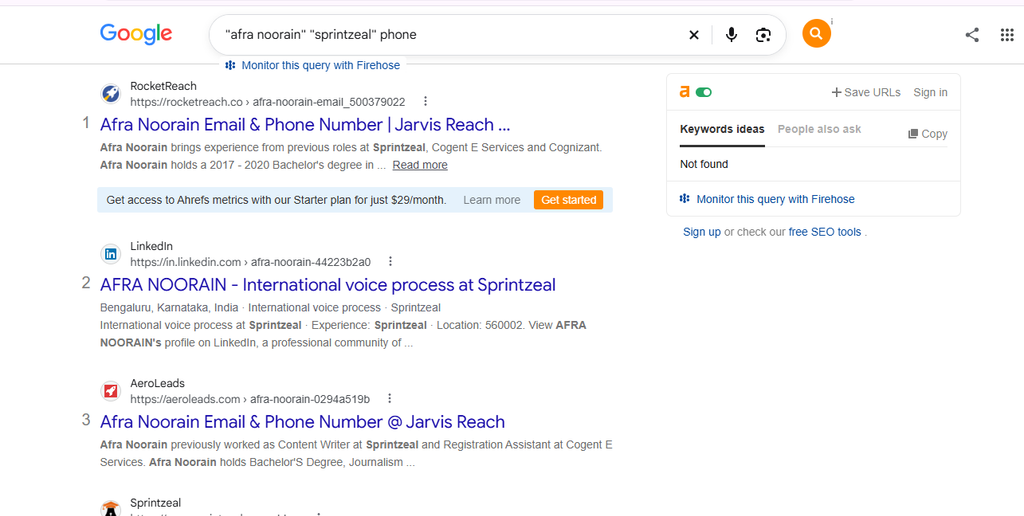
To find phone number, we tested this method using a person’s name and relevant details. In our search, we found a phone number. The query “Full Name” “Company” surfaced the person with a direct line.
Results may change depending on how much information is publicly available and whether the person has a common name.
Google listed prospect details.
2. Check the Company’s Official Website
A company website is one of the first places to check for an official phone number. Businesses often publish their main office, sales, customer support, or regional contact details.
How to do it:
- Search the company name and open its website.
- Check the Contact Us, About, Support, Team, or Locations pages.
- Look at the bottom of the website for a general phone number.
- Need a specific department? Check its page or regional office details.
- Make sure the website belongs to the right company.
If you need a supplier’s number, visit its official website. Check the sales or customer service page for contact details. If you need to get in touch with the employees, then the office number can be useful, but it might not be their personal number.
Best for: Official business numbers, customer service contacts, suppliers, and company departments.
Limitations: Not every company publishes employee phone numbers. A main office number should not be mistaken for an individual’s direct number.
For B2B research, this difference matters. A main number can confirm that the business is legitimate. It may not connect you directly to the person you want.
What we found in our test
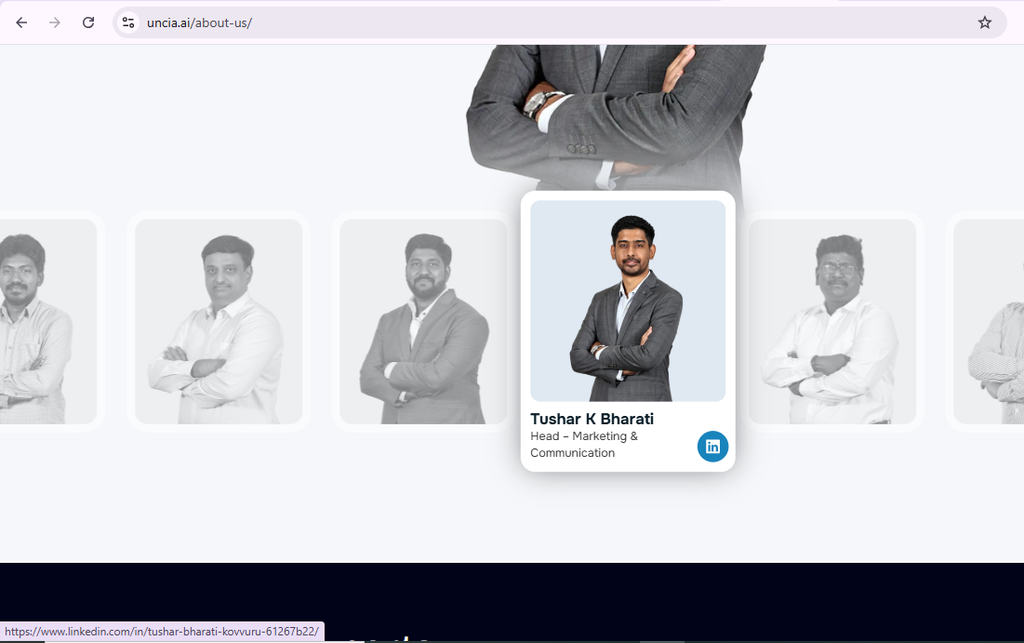
We checked the company’s official website to find phone number. We found the person’s LinkedIn profile, but we were not able to find a phone number on the website. This shows why an official company website may help confirm a person’s role without always providing their direct number.
Website listed prospect social media platform.
3. Use Google Map or online business directories
You can use business directories to get contact information of a local business through their address, website, operating hours, and phone number.
In the case of a US business, you can refer to publicly available business directory listings along with industry-specific directories. Always compare the listing with the company’s public website.
How to do it:
- Search for the business name and city or state.
- Open a listing that matches the company.
- Check its website, address, and other business details.
- Compare the phone number with the official website.
- Treat old, incomplete, or conflicting listings with caution.
Best for: Local businesses, service providers, suppliers, and companies without an easy-to-find contact page.
Limitations: Directory information can become outdated when a business moves, changes its number, or closes. A listing alone does not prove that a number is still active.
For example, if you are looking for a phone number of a local supplier. A business directory could have the number you need. For a sales prospect, confirm the number through another source before using it.
What we found in our test
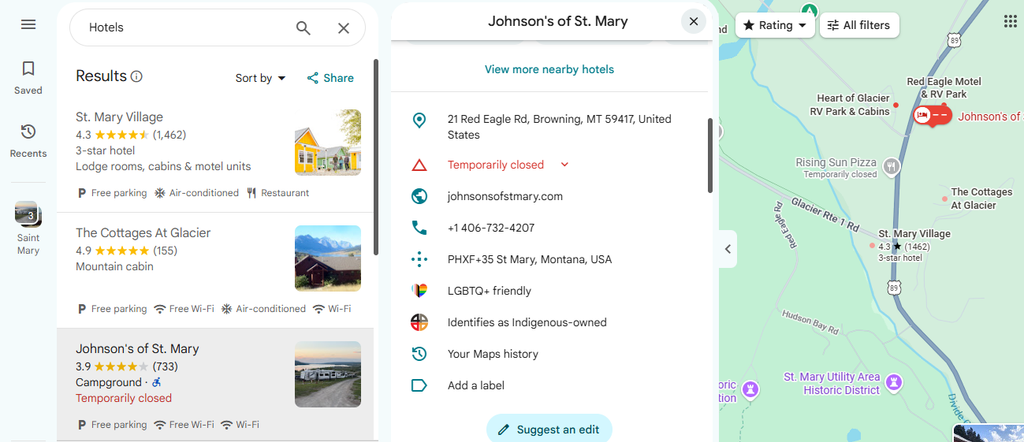
We searched for a hotel on Google Maps to find phone number. And we found its phone number, address, rating, and website in the business listing. The number was not displayed in the web search results.
Google Maps business listing with phone number, address and rating highlighted
4. Check social media profiles
The social networking websites might help when an individual or organization opts for making their contact details available to others. One cannot assume that all profiles would have a phone number.
Check the profile or business page for public contact details. Business Pages may display a phone number when the owner has added one.
Best for: Local businesses and public business profiles.
Look at the profile bio and any public contact options. Business and professional accounts may provide contact buttons.
Best for: Small businesses, creators, and service providers.
LinkedIn can help you identify a professional contact and their current company. It is not guaranteed that a number will appear. LinkedIn also lets members control which contact details they share. A phone number added for account access is not automatically displayed on a profile.
Best for: B2B prospect research.
If the number is not public, use the profile to confirm the person’s role and company. You can then check the company’s website or use a verified B2B contact database.
X (Twitter)
Check the bio, pinned post, and website link. Brands sometimes list a support number, but individuals rarely do.
Best for: Brands and public figures with active accounts.
How to use social media effectively:
- Search for the person’s name and company.
- Check if the profile belongs to the right person.
- Look for any public business contact details.
- If there is no number, check the company’s website or contact page.
What we found in our test:
We checked LinkedIn, Facebook, and X for all 10 contacts and found no phone numbers. LinkedIn showed email addresses for some, likely because of members’ visibility settings.
5. Ask a mutual contact
A mutual contact can help you reach the right person without searching through multiple databases.
How to do it:
- Find someone who knows the person.
- Tell them why you need to reach the person.
- Ask them for an intro or to pass the message.
- If the person agrees, they can share their number.
For example, if you are trying to reach a sales manager and someone you know already has their contact. Asking for an introduction could save you the trouble of checking several directories.
Send a message like this to the mutual contact and get phone numbers politely.
“Hi, I noticed you know [Professional’s Name]. Would you be comfortable introducing us for a work-related query?”
Best for: Professional introductions and reaching the correct contact when public sources are limited.
Limitations: This method depends on your network and is not suitable for finding large numbers of contacts at scale.
6. Check Government and Business Registries
A state business registry can help you check if a company is officially registered. It may also list basic business details.
For example, you can check the relevant state business registry when a company’s legal name is unclear. The registry may provide an entity name, registered office, agent information, or filing details. It is not guaranteed that a phone number will appear.
Another useful source for official agency numbers is government websites. When searching for government agency information, you can begin at the official agency website or USA.gov.
How to do it:
For private companies, use your state’s Secretary of State business entity search.
For publicly listed companies, use the SEC EDGAR company search.
Open a recent filing and check the cover page for the business address and phone number.
Compare the details with the company’s official website.
Best for: Confirming businesses and finding official government contacts.
Limitations: Records vary by state and agency. A registered agent or office contact may not be the number of the employee you want to reach.
What we found in our test:
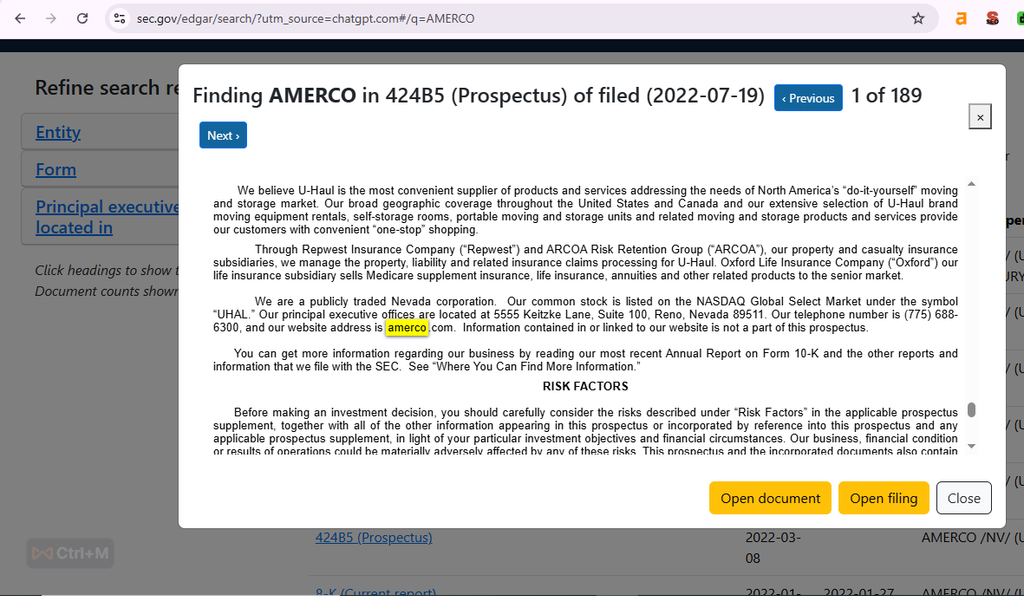
We checked 5 companies. SEC EDGAR filings listed a telephone number for 2 of them, both publicly listed. State registries showed addresses and registered agents but no phone numbers.
SEC EDGAR listed AMERCO’s business address and telephone numbers in its published records.
7. Try a Phone Number Finder or Contact Lookup Tool
In case your searches using the public search engines are not providing enough information, use a phone number finder. The outcome depends on the database of the tool and the search options provided.
There are some tools that will provide reverse phone lookup results. There are other tools that assist businesses in finding their professional contacts based on the name, title, company, industry, and location of the person.
Before subscribing to any of the tools, it is important to verify if it offers phone numbers on its free service.
How to choose a tool:
- Check if it can find personal numbers, business numbers, or both.
- See how many free searches you get.
- Check which countries the tool covers.
- Check if the tool shows names, locations, and carriers.
- Read its privacy policy before uploading contacts.
Best for: Searches that require more than public websites can provide, especially B2B prospect research.
Limitations: No tool guarantees a match for every person. A free search may show a preview without revealing the phone number.
What we found in our test:
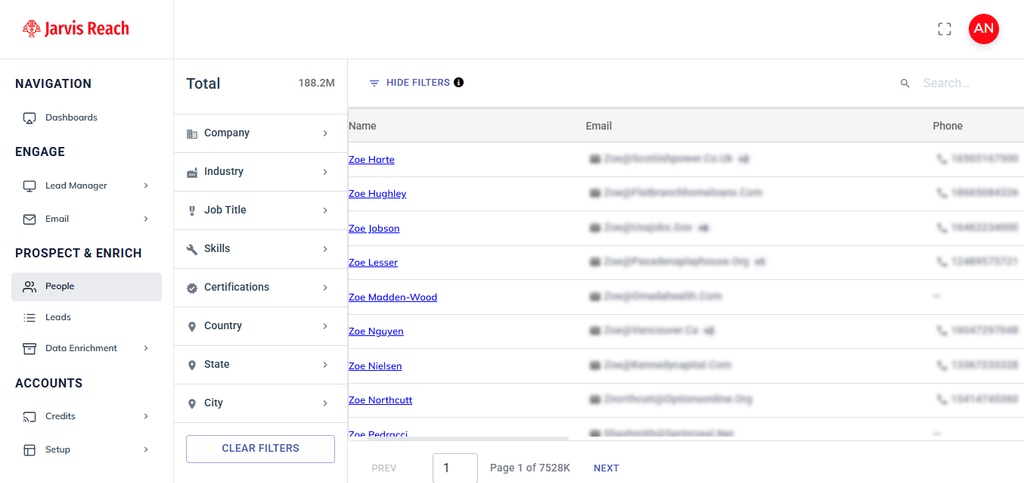
We searched for professional contacts using Jarvis Reach and found phone numbers in the returned results. In our test, Jarvis Reach returned a phone number for 7 of 10 contacts, and 6 matched a second source.
Jarvis Reach listed the phone number of the prospect along with their email address.
We tested each method on 10 B2B contacts (sales and marketing managers at US companies with 50–500 employees) and 5 local businesses between Oct 20 and Oct 24, 2026. A “find” means a number we could confirm on a second source.
| Method | Contacts tested | Numbers found | Confirmed on 2nd source | Avg. time per search | Cost |
|---|---|---|---|---|---|
| Google search operators | [10] | [3] | [2] | [4 min] | Free |
| Company website | [10] | [1, main line only] | [1] | [2 min] | Free |
| Google Maps / directories | [5 businesses] | [5] | [5] | [1 min] | Free |
| Social media (LinkedIn, Facebook, X) | [10] | [0] | [0] | [3 min] | Free |
| Government / business registries | [5 companies] | [2] | [2] | [5 min] | Free |
| Mutual contact | [3] | [2] | [2] | [1–2 days] | Free |
| Jarvis Reach (free plan) | [10] | [7] | [6] | [30 sec] | Free credits |
For single local businesses, Google Maps found a number every time. For individual B2B contacts, free public sources found 3 of 10 numbers, while a contact database found 7 of 10.
The method you choose should match the goal. Searching for one business number is different from building a B2B prospect list. For a small search, free public sources may be enough. For larger lists, you need a way to verify and manage contact data at scale.
How We Tested and Reviewed These Methods
For testing these methods, we used open-source websites, business listings, professional profiles, government directories, and a contact finder application. We looked for contact information and noted what each source showed us.We also noted when a phone number was unavailable.
We reviewed each method based on three factors: availability of phone numbers, usefulness of the information, and limitations of the source. Our findings reflect the results available during these checks. Contact details can vary by source, profile visibility, and data availability. We recommend verifying important information against an official source before using it.
Our take: Don’t pay for a tool to find one business number; Google Maps and the company website will get you there in minutes. Pay only when you need 20 or more verified direct dials, because that’s where free methods stop being free in time. Verify the number from another source. Use others’ phone numbers responsibly. If the prospect doesn’t want you to call, respect their opinion.
Best Tools to Find Phone Numbers (Free Plans and Trials)
There are a few tools which help businesses to find phone numbers without searching each website manually. Most of the tools have filters. The tools utilize filters like name, company, job title, location, or industry. Some even offer emails and other contact information.
The free access varies from one site to another. The free package might come with credits or a number of searches instead of unlimited phone searches. Check the current terms before choosing a tool.
Disclosure: Jarvis Reach is our product. We have included it alongside competitors and listed its limits, so you can compare fairly. We tested Jarvis Reach hands-on; details for the other tools come from their official pages as of Oct 28, 2026.
1. Jarvis Reach
Jarvis Reach is a B2B lead generation platform with access to verified contact data. Its search helps users find professional contacts’ phone numbers. You can search by company, job position, location, or industry.
The platform states that it also provides direct and company phone numbers.
New users can access 100 free credits each month. Checked on [Oct 28, 2026]. The free plan also includes unlimited contact viewing and access to direct and company phone numbers.
This makes it useful when you need to find several B2B contacts rather than search for one public business number.
Limitation: A contact does not automatically have a phone number available. Data availability can vary by person and company.
2. Saleshandy
Saleshandy Lead Finder says it provides access to contacts across companies. It offers filters for finding phone numbers of specific professionals and can reveal verified phone numbers and emails. Its current product page also describes real-time verification and waterfall enrichment. A 7-day free trial is allowed. Checked on [Oct 28, 2026].
Limitation: Free access is limited. Phone availability also depends on whether Saleshandy has usable data for the contact.
3. Cognism
Cognism focuses on B2B sales intelligence rather than general reverse phone lookup. Its platform states that it provides phone-verified mobile numbers for professional contacts. Its diamond data goes through additional verification before being marked as phone-verified.
Cognism currently states that it has phone-verified contacts globally. It also says director-level and above data is refreshed every 30 days. Checked on [Oct 28, 2026].
The platform also places strong attention on compliance. Its data process includes checks against Do-Not-Call lists across multiple territories.
Limitation: Cognism is designed for business users and does not operate like a simple free reverse phone lookup website. Pricing is based on business requirements rather than a standard free consumer lookup plan.
4. Apollo.io
Apollo is a B2B prospecting platform. Users can find phone numbers, professional emails, and direct dials as part of its contact search.
Apollo states that they are currently offering a free plan with 75 credits per month. Checked on [Oct 28, 2026]. Phone number access uses 8 credits per number. Paid plans provide more credits and additional prospecting and enrichment features.
Limitation: The free plan has limited credits. A phone number is not available for every contact, and revealing phone data consumes credits.
“Google and company websites are usually enough when we need a few phone numbers. For larger prospect lists, contact tools help us work faster. We still check each number before reaching out because outdated details can waste time.” Subhranshu Kumar, Associate Director, 14+ years in B2B Sales
How Does a Phone Number Lookup Work?
A phone number lookup helps you find details linked to a phone number. These may include the caller’s name or other details. The results vary by service. They also depend on the type of number.
There are two common types of lookup.
Phone number search: You start with a person’s or company’s details and look for a phone number associated with them.
Reverse phone lookup: You begin with an existing number. Then try to identify the person, business, or the information behind it..
The lookup service will provide either a business name, a potential identity of the caller, a carrier, a line type, or spam complaints. Some lookup services give more information, while some do not give much.
There is no guarantee of success. The phone number can be shared, reassigned, unlisted, or linked to incomplete data. The caller ID could be misleading as well.
What Is Reverse Phone Lookup?
Reverse phone lookup is a search technique that begins with a phone number instead of a name of an individual. Reverse lookups can be done in order to find out who made an unknown call.
How it works:
- Enter the number into a lookup service.
- Review any name, business, or other details the service returns.
- Compare the details with other sources.
- If the details are missing or do not match. Don’t trust the result.
A free reverse phone lookup may provide basic information without charge. Other services may limit results or require payment to reveal additional details.
Use caution with websites that promise to reveal extensive private information or require unnecessary personal details to access a result. A lookup result is a lead to investigate, not proof of a caller’s identity.
How to Check Phone Numbers Before Reaching Out
The first step is to find phone number. You also need to check whether the number is current and belongs to the right contact. Calling an incorrect number can waste time. In B2B, old phone numbers can waste a sales team’s time.
People change jobs, and companies may change their phone systems. That can leave contact records out of date. Some numbers may also stop working. The rate of data decay may vary by dataset and industry. That is why sales teams should verify important contact details before reaching out.
Use the following workflow to reduce avoidable errors.
1. Source Your Data from a Verified Lead Database
Start with a reliable source when you need several professional contacts. B2B lead databases may use multiple data sources and verification processes to improve contact accuracy.
Look for providers that explain how they collect and verify phone data. A verified label might improve confidence. But it does not confirm that all numbers will be valid.
2. Cross-Check the Digits Across Multiple Data Providers
Do not trust one source blindly. Recheck the person’s name, job title, company, and phone number against another trusted source.
For example, the database shows a number for a sales manager. Check the person on LinkedIn and look at the company site too. They may have moved to another company, and the number could be old.
3. Check the Country Code and Number Format
Before calling another country, check its country code. Phone numbers can be written in different formats. So, a number may look different without being wrong. It could just be saved in another format.
4. Use a Low-Profile Verification Method When Appropriate
In some business contacts, a short and professional message could help in ensuring that you have reached the right person.
A response from the prospect does not mean that you have found the correct person. Make sure your message is brief and relevant to your purpose of contacting them. For cold business messages, follow the rules that apply to your outreach.
5. Use Bulk Verification for Large Contact Lists
When a sales department is attempting to get a number from a hundred or thousand records, manual verification gets increasingly complicated. A bulk verification and enrichment tool can be useful in pinpointing invalid and missing data over wide lists.
Using this will help save time in preparing the lists. Still, automated verification should support human checks, not replace them.
When dealing with valuable leads, it is necessary to double-check the necessary information before contacting them.
Most Common Mistakes to Avoid While Finding a Phone Number
Just because you find the number does not mean that it will be correct. A couple of simple steps can save you from making unnecessary calls.
Trusting Outdated Data
When someone changes jobs or replaces their number, a phone number can become outdated. Public directories may also take time to reflect these changes.
Solution: Check the number against a recent source. For important prospects, compare the contact’s name, company, and role before calling. A verification tool can help, but no system can guarantee that a number will remain active.
Ignoring Time Zones
Contacting an individual outside their working hours might negatively affect your chances of receiving a reply. This is particularly the case when you deal with people from different nations.
Solution: Check the prospect’s location before calling. Use the company’s office location or the contact’s professional profile to estimate the relevant time zone. Schedule calls during reasonable local business hours.
Relying on One Source
Even trusted databases can contain outdated or incomplete records. Never trust one source blindly as proof.
Solution: Use the two-source rule for important contacts. Compare the phone number with another trusted source such as the company’s official website or a professional profile.
Privacy and Legal Compliance: What You Must Know
Finding a phone number that is available does not mean that you can use it for marketing.
Before using contact information for business outreach, consider the following:
Understand the Rules That Apply to Your Calls
The US has federal and state rules that govern some kinds of telemarketing and telephone outreach. The FTC’s Telemarketing Sales Rule and the National Do Not Call Registry are relevant to many consumer telemarketing activities. But the requirements and limitations vary by situation.
Start with the FTC’s Telemarketing Sales Rule guidance and check the requirements that apply to your specific outreach.
Respect Privacy and Contact Preferences
A public number does not mean you can use it for marketing. Get permission before making marketing calls. Follow local rules and stop calling if someone asks you to.
Be transparent
Be aware of the source of the contact details you have. In case a prospective client asks you where you get their number, you need to answer.
Maintain the record of the consent and request for the withdrawal of consent if required. Do not contact those people who do not want to be contacted.
The safest approach is to find the right business contact details, verify them, and use them only for legitimate business purposes, within marketing and privacy laws.
Final Thoughts:
For one business number, start with Google Maps and the company’s website. For individual contacts, try Google search operators, then confirm the number on a second source. If a number isn’t displayed in one source, use another one. We’ve checked the results and noticed that they differ according to the source used, so cross-check the information provided before calling anyone.
To search for business contacts, you can use Jarvis Reach to look up the required professional contact information based on various filters. Free sources may be enough for occasional searches. If you have more leads, a contact lookup tool can save time.
FAQ
1. How can I find a phone number for free?
Search Google, Google Maps, official company websites, and public directories. You can also try a phone number lookup tool with free access.
2. Can I find phone number details without a name?
Yes. A reverse phone lookup allows you to identify details using only the number, though results may vary.
3. Are free phone number lookup tools accurate?
Accuracy varies by provider. Verify results using an official website or another reliable source.
4. What’s the safest way to find phone number details?
Make use of reliable directories or phone number lookup sites. Stay away from websites that ask for unnecessary personal information.
5. How do I find phone numbers on LinkedIn?
Open the person’s profile and select Contact info. A phone number appears only if it has been added and is visible to you.
6. Is it possible to find a phone number using an email address?
Yes. A large number of contact enrichment tools are capable of reversing an email to locate a profile and phone number associated with it.
7. What’s the difference between People Search and Contact Enrichment tools?
People search tools help find information about individuals. Contact enrichment tools add details such as business phone numbers and job titles to existing records.
8. Is there a tool that combines email verification & phone lookup?
Some B2B databases, including Jarvis Reach, Apollo and Saleshandy, return both an email and a phone number for a contact. Check each tool’s verification method before you rely on it
9. Are phone number finder software and lookup tools the same?
The terms often overlap. Check whether the tool supports finding new numbers, reverse lookup, or both.
10. What is the frequency of updating my database on phone numbers?
Check your contact list regularly, especially before a big campaign. If any numbers are old or no longer work, update them.
11. How can I tell if a number is a scam?
Do a reverse lookup on it. When it has many “spam flags” or does not correspond with the name of the person to whom you are expecting, be careful.
12. What is the best way to find phone numbers using their website?
The best way is to visit the company’s official website. And check its Contact, About, Support, or footer sections for any phone number mentioned.