
Sales automation, or sales cycle automation, is the strategy of using technologies to eliminate repetitive tasks, improve efficiencies, and increase sales team productivity.
Sales automation tools facilitate nurture campaigning, lead management, and CRM integration to aid sales agents in meeting the changing dynamics of the sales cycle and increasing revenue production rather than spending hours on administrative work.
We are going to examine the fundamentals of Sales Automation in this article: how it works, its top benefits, and the tools and processes it fits in today’s digital sales world.
How does Sales Automation work?
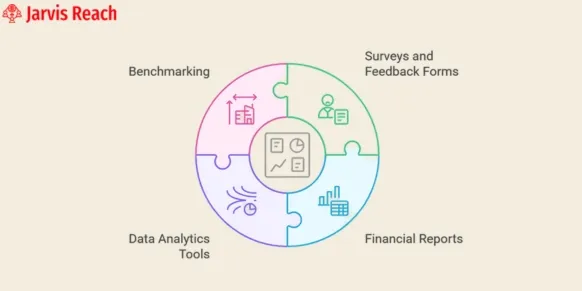
As mentioned in the earlier section, Sales Automation refers to the process of applying advanced software to reduce manual tasks in sales operations.
Essentially, it is similar to outsourcing your sales cycle to software platforms such as CRMs and AI sales tools with CRM integration.
This is not to say that this software could replace sales representatives, but instead it reduces the busy work in a salesperson’s day such that they are able to focus on their main objective: selling to and obtaining clients, ultimately driving revenue growth.
Process of Sales Automation
In this section, we will be discussing how to automate the sales cycle in simpler steps. Let’s start with the basics of the sales automation process.
Step 1: Identify your team’s most time-consuming task
Firstly, identify the team’s most time-consuming tasks that are repeated the most in the sales automation process.
You can do this by interviewing your current sales team on their daily activities from lead generation to closing, and note down the activities that feel the most repetitive and can be automated.
Another way is to explore the industry’s best practices or research the automation features that are already built into your CRM integration or other automated sales tools before investing in new ones.
The goal here is not to automate everything all at once but to start with simpler tasks and focus on getting those right, and then expanding automation.
Step 2: Find the right tools to automate workflows
To find the right sales automation tools, it is important to know that there is a wide variety of tools with different purposes used in the sales cycle.
Prospecting tools are used to make research much easier, while lead management software is used to automatically score, route, and schedule meetings with potential clients.
Email automation tools are used to send follow-ups and share content without prolonging the process, thus supporting nurture campaigning and helping to boost conversions.
Team management platforms, on the other hand, keep sales and marketing aligned by organizing tasks and insights.
Another useful way to go about finding the right sales automation tools is to explore AI-powered tools for lead generation to help further improve efficiency and drive revenue growth.
Step 3: Structure your data
All sales representatives must know that keeping their B2B data organized in one uniform way can help every team member use CRM integration and sales automation tools more effectively. If the data is consistent, it is easier to make the right digital sales and marketing decisions.
Here are some examples of sales tasks that can be automated:
– Creating and personalizing cold email templates
– Email follow ups
– Multi Channel Prospecting
– Lead Scoring
– Phone Outreach
– Scheduling Meetings
– Post Sales Support
Key Tools
– Lead generation & qualification: capture prospects efficiently and score them so you focus on the right ones.
– Automated follow-up emails: set up trigger-based email sequences so no lead goes cold.
– CRM data entry & management: automate logging of interactions and updates in your CRM to keep data accurate and up-to-date.
– Sales pipeline tracking: visualize and move deals through stages automatically, monitor progress, and avoid bottlenecks.
– Sales forecasting: leverage data-driven insights to predict revenue, plan team targets, and improve decision-making.
Key Benefits of Sales Automation
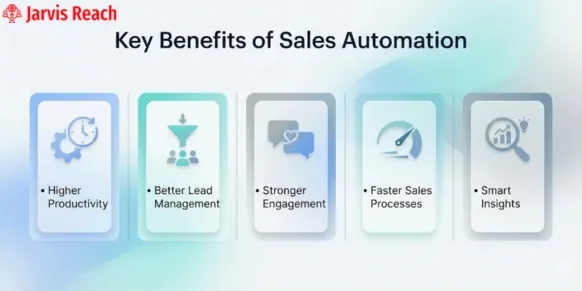
In this section, we will be looking at the most important aspects of Sales Automation and the Sales cycle.
1. Better Productivity
By automating most of the sales cycle, salespeople have fewer repetitive tasks to perform and are able to focus on more vital work each day.
In one study by Annuitas Group revealed that companies using automation for nurture campaigning benefit with a 451% increase in qualified leads.
Effective lead management through CRM integration further improves productivity by ensuring data accuracy and seamless collaboration.
2. Increased Sales
Sales automation also allows reps to do much more work in less time, thus prioritising calls, meetings, and closing deals.
A McKinsey report states that automation of standard tasks is one of the megatrends that shapes the global economy, and that approximately a third of the sales operations can be easily automated with today’s technology.
This directly contributes to revenue growth and more efficient digital sales strategies, and more accurate sales forecasting.
3. Faster Ramp Periods
Sales ramp-up time is the duration from when a new sales rep is hired to when they consistently achieve their sales targets. It is usually a critical period of time during which a new rep transitions from a beginner to a fully productive team member.
Sales automation ensures shorter ramp times, leading to higher close rates, quicker productivity, and a boost in revenue growth.
Commonly Used Sales Automation Tools
The Sales Funnel consists of many administrative tasks, which is why brands increasingly promote the use of sales automation tools.
In this section, we will be looking at the commonly used sales automation tools and platforms that can help streamline the sales cycle, improve nurture campaigning, and drive revenue growth.
1. Jarvis Reach
Jarvis Reach is a free browser extension-based sales intelligence and lead generation platform that is designed to meet the diverse needs of every business by offering a range of powerful features that simplify prospecting and automate key parts of the sales cycle, empowering teams to boost efficiency, optimize digital sales, and drive revenue growth.
Key Features:
– Customizable workflows and campaign sequencing
– Real-time data enrichment and automated sales lead capture
– Multi-channel outreach, including email and LinkedIn Integration with CRM integration
– Mobile access and browser extension for seamless lead exploration
Also, learn about why Jarvis Reach is a better alternative to ZoomInfo for sales automation.
Pricing:
The platform offers three different tires, other than the free tire that provides the user with 100 credits per month.
Free Plan: This plan comes with a 14-day free trial and gives the user 100 lifetime credits to access direct and company emails as well as be able to export 50% contracts to CSV/ Excel.
The paid plans are as follows:
Basic Tier: The user has 4400 credits per month, which grants unlimited access to contact profiles and emails. Plan starts at $78.42 per month.
Advance Tier: The user has 6600 credits per month, which grants unlimited access to contacts and the ability to export 75% of the contacts to CSV/ Excel. Plan starts at $118.42 per month.
Enterprise Tier: The user has 13200 credits per month, which grants unlimited access to personal and company phone numbers and the ability to export 100% contacts to CSV/ Excel. Plan starts at $126.73 per month.
2. Mailtastic
Mailtastic is another popular sales automation and marketing automation tool that focuses on the most overlooked part of the sales cycle: the email signature.
This user-friendly email signature marketing tool helps you to showcase relevant content, events, support nurture campaigning, and drive revenue growth. This intuitive platform allows businesses to standardize email signatures across teams and track performance to improve digital sales.
Key features:
– Targets specific groups with personalised signature banners
– Built-in compliance and central control of email signatures
– Integrates with Gmail, Outlook, IOS, Android, Active Directory, and CRM integration.
Pricing:
Mailtastic offers users a 14-day free trial. You can also choose from 3 pricing packages: Management, Marketing, or Pro. Prices are disclosed only on request.
3. Salesforce:
Salesforce is one of the most widely used sales automation and CRM integration tools that help businesses of all sizes manage every part of the sales cycle more efficiently, from lead management and nurture campaigning to pipeline tracking—thus driving consistent revenue growth through smarter automated sales workflows.
Key features:
– This platform helps to offer a complete overview of customers’ activity history, key contacts, customer communications, and internal account discussions
– It helps to track your leads from the very first step to the last
– It provides real-time views of your team’s sales forecasts, supporting smarter targets and reliable sales forecasting.
Pricing:
Visit Salesforce’s website to download their pricing guide or to request a quote.
4. LinkedIn Sales Navigator:
LinkedIn Sales Navigator is another effective sales automation tool for modern prospecting and digital sales.
Although this built-in LinkedIn tool does not provide direct contact data like email addresses or phone numbers, it complements other tools like Jarvis Reach by offering unmatched sales cycle insights, advanced filtering, and personalized engagement opportunities.
Key features:
– Advanced lead search
– InMail messaging
– Real-time sales updates
– Notes and tags synced with your CRM integration
Pricing:
LinkedIn Sales Navigator offers three pricing plans: Core, Advanced, and Advanced Plus. Visit its website to compare features and costs.
How to set up Sales Automation:
Now that we have discussed the basics of sales automation and various platforms/ tools offering automated sales. Let’s look at a step-by-step process for setting up sales automation.
Map your current sales cycle:
First, start by documenting how your sales funnel works from the very first step to closing deals. A clear visual flowchart helps to spot redundant tasks and opportunities for improvement.
Before you implement automation, the first step is understanding your sales cycle.
Identify Tasks Worth Automating
Next, identify some tasks that are manually repetitive. That may mean drafting the same follow-up email, entering records into a CRM for your team, or scheduling. In either case, automating these tasks will help create space for the higher-value tasks, such as nurturing campaigns or closing opportunities.
Choose the Right Sales Automation Tools:
Select the tools that would work best with the needs of your team and workflow. Ideally, these tools should: Integrate seamlessly with your CRM integration system
Offer features for Lead management and follow-ups
Be intuitive and scalable as your business grows, supporting digital sales.
Connect and Automate Workflow:
Set up smart triggers based on prospect behaviour or deal stage changes. These could be:
– A form submission triggers a welcome email
– Deal stage transitions automatically create follow-up tasks
– Lead behaviour triggers lead scoring, alerts
Test and Refine:
It is always best to run a test drive with a small team or workflow segment. During this test drive, monitor how the automation performs and collect feedback. Accordingly, tweak the tasks, time, and messaging until they align with your sales cycle goals.
Measure Results and forecast:
Use dashboards to help track performance, such as leads handled, conversion rates, cycle time, pipeline movement, and sales forecasting accuracy. This allows for smarter decisions, improves forecasting, and highlights areas where sales automation isn’t as effective.
Scale your Automation:
Salesforce is one of the most popular sales automation and CRM integration systems, helping organizations of any size to optimize every part of the sales cycle, from lead management and nurture campaigning to pipeline tracking, thereby creating predictable revenue streams more intelligently and automatically through sales workflows.
FAQs
Q. Will sales automation take away jobs from human sales reps?
No, sales automation aims to complement human capabilities rather than replace them. Sales automation is responsible for the administrative tasks. Sales reps can use the time freed up from the administrative work to conduct the high-value work of closing deals and building relationships with customers.
Q. Can sales automation be overdone?
Yes, it can, in fact, be overdone. Over-automation can make your outreach efforts look like a generic email that anyone could send out. When the outreach effort comes across in this way, it has been shown that this approach can damage customer relationships.
Q. What is the difference between sales automation and marketing automation?
Marketing automation looks after the top of the funnel, one-to-many, generating and nurturing leads until the lead is sales qualified. Sales automation applies to the middle and bottom of the funnel (after the lead is qualified).
Q. How do I get started with sales automation?
To get started with sales automation, first, complete an audit of your sales cycle to look for or to understand the time-consuming, repetitive tasks that you or other sales reps are currently doing, or if you are familiar with any existing bottlenecks in the sales cycle.
Conclusion
Sales automation is no longer about just saving time but is focused on selling smarter. By optimizing the sales cycle, strengthening nurture campaigns, improving sales forecasting, and driving revenue growth, automation tools turn everyday tasks into opportunities. As technology continues to evolve, businesses that adopt dynamic strategies are the ones leading the charge, helping teams focus on closing deals rather than wasting time on repetitive tasks.