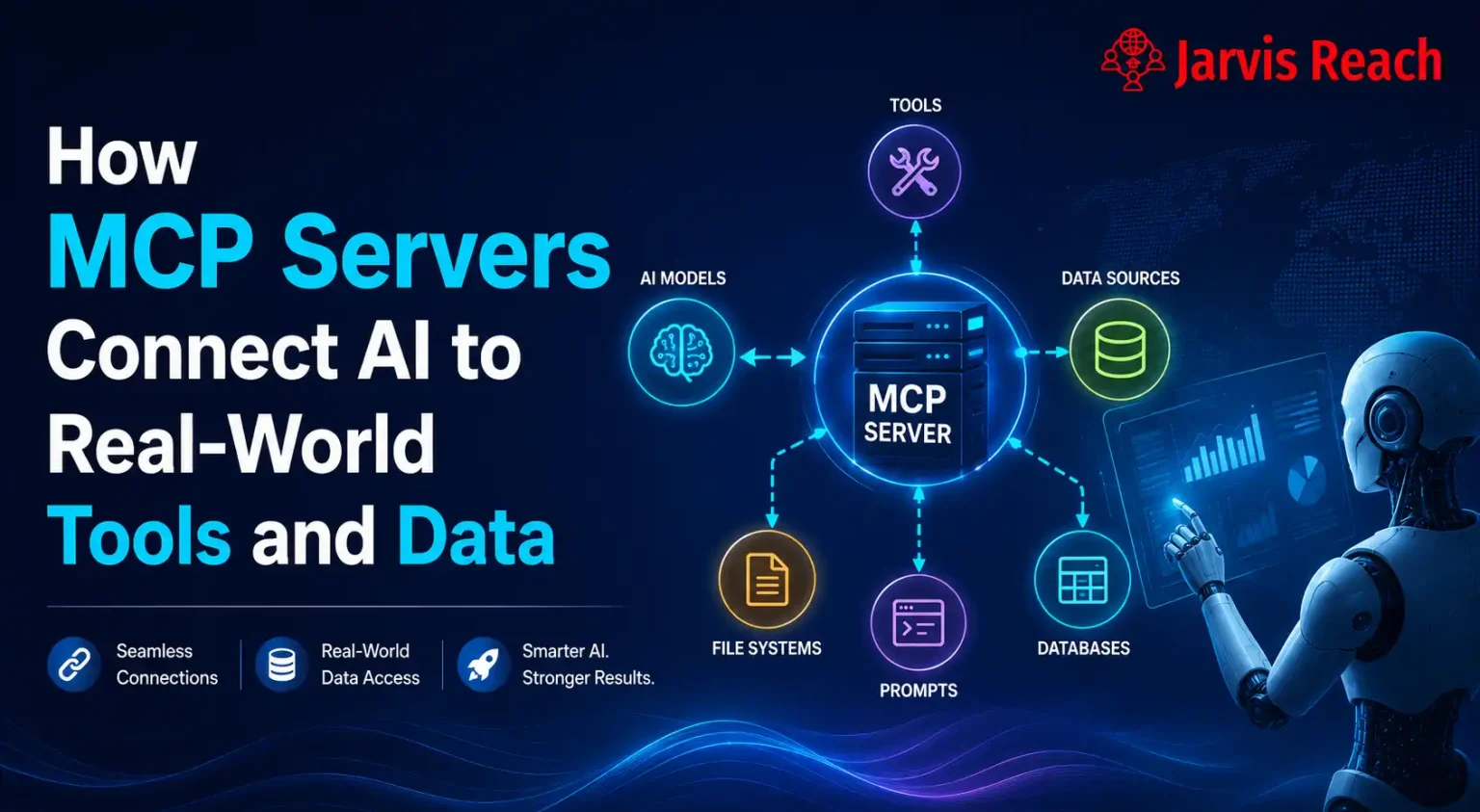
Model Context Protocol (MCP) Server is a standard protocol that bridges the gap between AI platforms and external systems like SQL databases, data sources, file systems, prompt templates, enterprise data, and tools. In simple words, an MCP Server acts as a universal connector that helps AI platforms access external resources and perform tasks without requiring separate integrations for every system.
And, this is what the MCP Server is. One MCP Server is enough for every kind of AI platform to meet its users’ demands smoothly without the need for human supervision.
In simple words, the MCP Server is the universal language that gets compatible with any AI platform with the help of MCP Client, making it easy for AI platforms to execute your task needs on your behalf.
And if you are wondering what MCP Client is, think of it as an MCP language translator. If you are also thinking about what role it has to do with MCP Server, then as you read further, you will get to know.
What Exactly Is The MCP Server?
MCP stands for ‘Model Context Protocol’. The server is like a USB-C for AI platforms. MCP Server is like a USB-C for AI platforms. Like how a USB connects two devices and allows you to use data sources, file systems from your phone to your laptop. Assume a laptop as an AI platform, and a USB-C as an MCP Server. Now, how USB allow the laptop to connect to your phone, which you can consider as your external system? Now, hold on to this example and think: different laptop brands are like different AI platforms, but for any laptop brand, we use the same standard USB-C to connect two devices together.
Similarly, for any type of AI platform, we use the same MCP Server. Like if you take any USB-C, they perform the same function, that is, to give one device access to your phone’s file systems or data sources.
The Simple Structure of MCP
To make it easier to understand the MCP Server, it is necessary to know the whole picture rather than only focusing on the center of the picture. So the whole picture, the simple structure of MCP comfortably follows in two manners:
1st Manner
In this manner, AI platforms have embedded an MCP Client within, and what happens here is that the natural language in which the user asks AI platforms gets translated there itself into MCP language by the embedded MCP Client, and then it directly goes to MCP Server, and the Server then gives access to its capabilities to AI platforms. Then, AI with access to data sources, enterprise data, SQL databases, tools, or prompt templates, gives the outcome that you (the user) wanted. Example: Claude and a few desktop apps.
| AI PLATFORM (Language Learning Model) ↓↑ MCP CLIENT |
↓↑
| MCP SERVER |
2nd Manner
Now, what makes this manner different from 1st manner is the standalone or individual MCP Client. So, how this manner works is, almost only, one thing is different, that is, instead of MCP Client being embedded inside the AI platforms, it remains as a separate gateway from AI application. In simple words, If user asked or demands some task in its natural language, then AI platforms, unlike in the previous manner, can’t translate there itself into MCP language; it has to send the request that you (the user) asked to individual MCP Client. Now, MCP Client will translate the natural language into MCP language, then it will forward it to MCP Server, and then the same process continues.
| AI PLATFORM (Language Learning Model) ↓↑ |
↓↑
| MCP CLIENT |
↓↑
| MCP SERVER |
The Common Line
So, to draw the common point of difference in these two manners is one single point, and rest of the mechanism is the same as it is.
That single point difference between these two manners is MCP Client position, where it lies. If it lies within AI platforms, then it works in the 1st manner, and if it lies outside of the AI platforms as a separate individual, then it works in 2nd manner. 1st manner works in two steps, and 2nd manner completes in three steps. But the flow of mechanism remains the same; From AI platforms to MCP Client (Either embedded/separate) to MCP Server, then back to MCP Client to the final destination AI platforms.
Important Note
But yes, one more thing, when the Model Context Protocol Server gives access to its data sources, SQL databases, enterprise data, file systems, or prompt templates, then it gives back in its MCP language only, which goes to MCP Client or AI ( if MCP Client is embedded within). So, here MCP Client works in one way direction, it can only translate into MCP language, and it works as a simple passthrough when MCP Server gives access to its capabilities. Then the one who translates the MCP language into user-friendly language is the AI platform itself.
Capabilities of the MCP Server
Like earlier said, Model Context Protocol Server is a universal protocol for building and maintaining all AI platforms’ task execution capability. But we can’t forget that USB-C can be of different brands, which means there can be different MCP Servers, but their main function remains the same: to be the rope to connect two endpoints. Coming to the point, what capabilities does Model Context Protocol Server have? So, there are 3 things that an MCP Server has :
- Tools
- Resources
- Prompts
Basically, how exactly these capabilities help AI platforms to perform the action the user requests, this refers to anyone who is using any AI platform, whether it be ChatGPT or Claude, telling what task AI platforms need to do on the user’s behalf. And these capabilities come in handy for AI platforms as it has access to tools that AI needs to execute the action that a user demands.
Examples
Tools
For example, you asked AI to calculate a math equation, and then from the user-friendly language context, the AI analyzes, decides which capabilities it wants from MCP Server, and converts it into a structured request format. Then after that, it sends to MCP Client, which recognizes the request format mentioning a particular capability (Tool, Resource, Prompt template) that user asked for, gets transformed into MCP standard protocol, which basically means, its own language. And then the Model Context Protocol Server provides the tool access to AI to solve this math equation.
So this is what we call a tool; it is something where information can be added, deleted, and changed. And then AI gives you the result based on the information/input you put in. But you can’t keep track of the information that you input every time while the tool is in use.
Resources
Now comes the resources, when a user asks to provide the weather data of the recent past 4 years, then again the natural language gets transformed into structure request that AI platform analyzes from the user-friendly language context. And then the MCP Client recognizes the structured request format ( asking for resources) and translates it into MCP protocol format. And MCP Server then looks for the resources backing all the weather data sources from the public weather file systems. Then it gives access to these data sources to AI, then AI structures the information and gives it to you (the user).
So, resources are the data sources that can only be read and can’t be changed, and it basically tracks the history of all changes happened in the SQL databases till now. SQL databases are nothing but a storage container for all types of information.
SQL databases are simply storage containers that hold different types of information.
Prompts
And, when prompts come in use, when the user asks AI to summarize data sources, or enterprise data in a certain manner, and for that, instead of user’s prompt, the MCP Servers’ package of prompt templates for every kind of task serves quite usefully, and after MCP gives access to these prompt templates to AI. Next, you, as a user, just have to input some specifics in the template, and then AI gives you (the user) the result you desire. So prompt is something that you can think of as custom templates, where you just have to fill in some specifics, and the AI interacts with SQL databases and gives you the particular result you want.
This Is How The Mcp Server Works
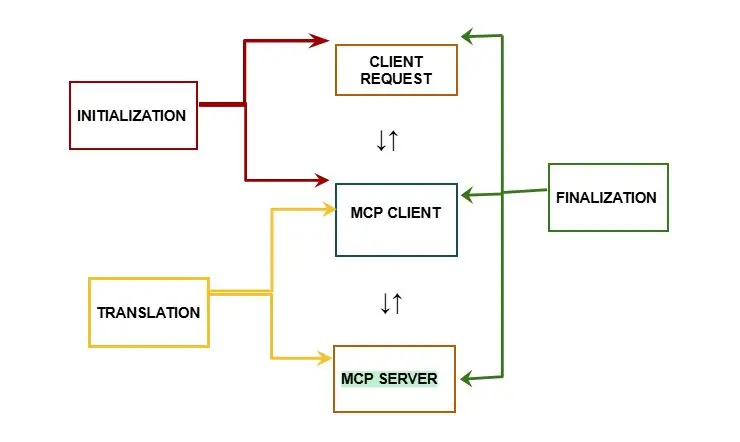
Now, since the whole picture of the Model Context Protocol Server, MCP basic structure, and its capabilities are known, it is time to zoom into MCP Server’s working area. So Model Context Protocol Servers work like this:
INITIALIZATION PHASE
So, first, what happens is that when a user demands or requests some task execution or asks to analyze data sources, summarize SQL databases, gather enterprise data, or retrieve file systems to AI platforms, which here acts as a client. From there, the initialization phase begins, so the client (AI Platform), according to your demand or request, decides what it needs, whether a tool, resource, or prompt template it needs from Model Context Protocol Server. After the AI platforms make the decision, it sends the request for what it needs exactly to MCP Client. And this is what we call a client request. This all sums up as the initialization phase.
TRANSLATION PHASE
So, this phase begins when initialization phase is over. Now, MCP Client, being an MCP language translator, easily translates the natural language (user-friendly) to MCP language. Now, once the translation is done, it sends the translated version (MCP language format) to MCP Server. Once MCP Server receives the client request in a translated version, it immediately obeys the request and gives access to the exact capability that AI platforms need while passing through MCP Client.
Model Context Protocol Server is nothing but a bridge that connects one end (AI Platform) to another (External Systems), and MCP Client is the gateway either at the other end (MCP Client embedded in AI Platform) or at the starting point of the bridge ( Individual MCP Client).
FINALIZATION PHASE
When the translation phase is over, the finalization phase begins, where the action is finally completed, and the cycle of interaction between these 3 elements (AI Platform, MCP Client, and MCP Server) terminates, and result is shown to the user. So, when the Model Context Protocol Server receives the request, sent by AI platform in a user-friendly language, translated into MCP language by MCP Client. Then, according to the capability of MCP Server demanded in the translated version, it gives access to that particular capability to an AI platform while passing back through MCP Client to AI platform.
And to remind you again, MCP Client is like a MCP language translator for sure; it recognizes the structured request, but it can not translate MCP language back to a user-friendly language.
Example of MCP Server bonding with the AI agent
Suppose there is a bridge between two lands, one is an AI platform, and the other is external systems: file systems, data sources (e.g., enterprise data, Excel files), and SQL databases. So, if there is no bridge, will AI platforms be able to access the external resources? Not possible, right, so logically, a bridge is needed to bridge this gap and connect the two lands. So, here, Model Context Protocol Server acts as the futuristic bridge, and MCP Client is like a futuristic gateway that takes user-friendly context language and transforms it into MCP language context.
Then, MCP Client allows it to pass through it, and next, according to the MCP capabilities ( Tools, Resources, or Prompt templates), MCP Server transforms itself into that particular capability bridge form.
Since MCP Server recognizes MCP language translated by MCP Client, it reads the capability bridge form requested by AI platform, and transforms itself into that particular capability bridge form. Then the same process continues.
Important Point
Now, keep this in mind, that in this whole process, here, MCP Server doesn’t make the decision what AI needs to fulfill the user’s request. Instead, AI itself analyzes the question and decides what is needed to fulfill the user’s demand, and sends the request to give access to data sources, file systems, SQL databases, or enterprise data from the MCP Server.
Local vs Remote Server
Now, as mentioned earlier, about the translation phase and finalization phase, now in that MCP Client how it communicates with MCP Server is called transport. Transport, because messages are being exchanged from one place to another, so this communication transport divides transport into two categories: One is called Local Server, and the other is called Remote Server.
Local Server
So, what type of communication points to Local Server, the way in which the communication is happening locally, means the MCP Client and MCP Server are within one single machine. For Example, think of the Model Context Protocol Server as you, who is making some handmade items, and MCP Client as your friend who is at your house now, helping you with what materials are needed and how to make them.
So here, as you can see, you and your friend are communicating with each other under the same roof while the interaction is going on, which equals to MCP Server and MCP Client living within a single machine where the interaction is happening. So this is what we call a Local Server. Local Server means Model Context Protocol Server and Model Context Protocol Client are on the same machine and not in different places.
Remote Server
This server refers to the communication that happens between MCP Server and MCP Client area while remaining in different places, so here, unlike a local server, the communication does not happen locally in the same place; instead, they are at separate places. For example, consider MCP Client as you and MCP Server as your friend who doesn’t live in the same city as you: basically, you and your friend are at a long distance. And you communicated with your friend to ask whether a particular material is available in your friend’s city through the help of network, which may be over an internet connection or phone signal.
And this equals a Model Context Protocol Server running on your laptop and a Model Context Protocol Client on a cloud server, which means they are communicating from a distance, and interaction is happening over a network medium. And, this is what we call a Remote Server.
Stateful Connection
Now, it is clear that the Remove Server means MCP Client and MCP Server live in separate places, and interaction happens through a medium. But there are two different ways to interact with Remote Server. So, one way to interact with a Remote Server is a Stateful Connection, where the Model Context Protocol Server remembers the state of what was ordered before by MCP Client and maintains that memory in case MCP Client needs it again. This is a Stateful Connection.
EXAMPLE
For better understanding, think of Model Context Protocol Server as a shopping platform like Amazon and Flipkart, and you as MCP Client. Suppose you are thinking to order something from Amazon, where you have ordered before, so you interact with Amazon and ask for a hand cream. And, when you click on a hand cream product image from that Amazon product page, down in the page or in the suggestion or recommended section, it might show somewhere as you have ordered before, or might suggest the same hand cream product or hand cream products from the same brand that you have ordered before.
Stateless Connection
Stateless Connection is the complete opposite of Stateful Connection. As the name suggests, it is “stateless”, which means it doesn’t have memory of any order or state, and that means no history or no track of what you asked or ordered before. This is another way to interact with Remote Server, while no memory or history record is promised.
EXAMPLE
So, take any website that offers a free tool or software, suppose there is a free image to PDF file format converter tool available on a website. Here you are a MCP Client, and MCP Server is that website, and you, as a MCP Client, interacted with the website that acts as a Model Context Protocol Server, where you asked for an image to PDF converter tool.
And once you have access without logging into the website, you insert that particular image file you want to convert through that tool, and within a few seconds you get the result, and then after that result, when you again come back to that website, you won’t have any history of your task or even find the converted file even if you logged into website in some cases. But if you logged into the website and if it keeps track of your file conversion history or stores the converted files, then it will be considered as a Stateful Connection rather than a Stateless Connection.
Why Does Model Context Protocol Server Matter?
Imagining AI platforms without the Model Context Protocol Server is like imagining today’s future with no AI. In other simple words, AI platforms behave like a multi-purpose platform, which can do a wide variety of things for you, which can perform tasks on your behalf, and can also show you how to make tedious and complex tasks can be as simple as walking. So, like now, AI platforms are able to do this because of the backbone support of MCP Servers.
Importance No. 1
Now, before Model Context Protocol Servers, AI platforms used to answer and solve your queries, no doubt, but they had many limitations: they were not that regularly updated on an hourly basis, couldn’t properly do tasks on your behalf, because they didn’t have the proper and quick access to backends (external systems), as AI platforms do now. So, this is a slice of how MCP servers have changed the AI’s smooth performance level. It is the reason why you get the latest and updated information from the AI platform since it gets access to original external sources, which are updated regularly.
Now, AI platforms can gain access to all data sources, SQL Databases, or enterprise data from MCP server, and can scrape through many websites, even retrieve the file systems, and give you what you need.
Importance No. 2
Without MCP Servers, to get the tools, prompt templates, backends: enterprise data, file systems, SQL Databases, or even other data sources was like a mess of tangled wires for AI platforms or any desktop apps, or phone applications. And tangled wires eventually get worn out or just short-circuit the whole system. MCP servers just solved the mess with their client-server architecture system. With these two components, Model Context Protocol Client and Model Context Protocol Server, they prevented the tangled wire situations for many AI platforms and apps.
Example
This simple example will definitely help you understand. Think of devices with power plugs of different countries as different AI platforms, and suppose you want to connect 3-5 AI platforms one at a time to backends (external systems), which here acts as the electricity or power source. So to connect one device plug of any country at a time, you would need to plug it into a switchboard that is compatible with that plug model. And the particular switchboard you need is hard to find in a different country from your home country, which is a hectic task indeed.
But here comes Model Context Protocol Server like a universal extension board, which will support plug wires of different countries, so in any country you visit, you just have to connect universal extension board (MCP Server) to the power source (Backends), and your device (AI platform) will work, having access to the source regardless of which plug type you have (AI platform type).
How Can The MCP Server Be Used?
Uses of Model Context Protocol Server can be many, from basic uses to advanced uses, so it depends on what you want. Model Context Protocol Server is a Client-Server based Architecture, which we already know, so this client-server duo can give an AI platform access to great possibilities, and that indirectly serves you in your task completion or making things easier for you.
Basic Uses ( For Beginners )
Now, you are familiar with Model Context Protocol Server. If someone asks about MCP Server, then you can explain it. You don’t need to limit it to only explanation, when you can use it to your benefit in a good way. So, those uses are:
Sending Emails Directly from Gmail
Yes, AI platforms can give you the email format, which you have to copy and paste into the email message and then send. But that is not the case with AI platforms with integrated MCP Servers, which can actually send an email directly to another person without you needing to do it manually. For example, you can use Claude for that.
STEPS
So first, you have to create an MCP Server in Zapier’s MCP dashboard by completing simple steps:
Create and name the MCP Server
So first you have to go to Zapier and then to its MCP Dashboard, then click on ‘New MCP Server’. There, you can select Claude as an AI Client, choose a name for the server, and then create it. For an easy way, just name it ‘Gmail MCP Server’, and that’s it. It is that simple.
Find Gmail Tool in the Server
Now, after that, inside the MCP server, search for Gmail tool, and then add it to your MCP Server.
Connect to your Gmail account
Next, connect to your Gmail account to give authority and grant permission to MCP server to access your Gmail account; otherwise, it won’t be able to send emails through your Gmail account. Now, another thing, you can choose the tool actions you want. There are 2-4 tool actions, but if you are a beginner, then choose these two tool actions: send email and search email action. So either Zapier’s MCP server can ask to choose the tool actions before connecting to your Gmail account, or after that.
Connect Zapier’s MCP Server to Claude
Now, after connecting your Gmail account to Zapier’s Gmail MCP Server, you will get a Server URL, so copy the Server URL for now.
Open The Claude
Next, open the Claude, go to its settings, and there click on integration and then click on the ‘Add Integration’ option.
Paste the URL
Now, remember, you got a server URL from Zapier’s MCP Server that you have copied. Now paste the server URL in the ‘Add Integration’ box and then just click ‘Connect’ button.
Sign In & Allow Access
So, once you click connect, then Claude may redirect you back to Zapier if you haven’t signed in to Zapier, or it will simply ask for access to your Gmail MCP server that you created just now, by asking you to click the ‘Allow/Authorize’ option for the access. It is for your security; it is basically authentication, the safe way to use MCP server with Claude ( AI Client).
Ask Claude to Send An Email
Since the integration of Zapier’s Gmail MCP Server with Claude is done, and authentication is also complete. Just ask Claude what you want to send and to whom you want to send. For example, here I have given a sample below:
‘Send an email to rosemerry@gmail.com informing her that her conference meeting with a foreign client has been postponed from Tuesday to Thursday.’ And, then after that, either it will say your email has been sent, or you can ask it whether the email has been sent, or you can simply check your Gmail to see whether email has been sent.
The Common Point For Basic Uses
Since I already demonstrated how exactly you can use these basic uses of Model Context Protocol Server by showing you the steps for one basic use: sending emails through MCP Server with AI. Now, the other basic uses that I will share below follow the same pattern. The only difference is the tools and their different actions you need to grant access to MCP Server for every different use.
Organizing Email Inboxes
Hre also, as before, the steps are almost the same as sending emails steps, the only extra step you need to do is ask Claude to organize your email inboxes, find unread emails, summarize important emails, delete the emails sent from this particular person/organization/application email account, etc, and then just allow access to do that, and it will do the work.
Organizing Files From File Systems
As it is crystal clear from the title itself, the AI platform that is integrated with Model Context Protocol Server, for example, Claude or any other AI platforms that support MCP Server, can organize your files from your file system, but you have to give access to your file systems to MCP Server, then it will be able to organize and give you cleaner folders and file systems.
STEPS
And, for that, the pattern is similar to sending email steps. Instead of Gmail tool, you need to add a file-system tool/Google Drive/Dropbox to Model Context Protocol Server, depending on where your files are. And then, after choosing the tool, select the actions you want to access, like for this file organization, you may see tool actions like view files, list files, rename files, move files, delete files, and create folders. And then follow the same steps, connect the server to AI platform, and allow the AI platform to access your file system.
Then, after accessing, you just say what file you want to create, delete, or move to a folder, rename the file with a new name, or even just organize all files into separate folders.
Web Browsing and Research
Now, here also, same pattern, the same steps to follow, but the tool would be a search engine tool or a web browser tool, which you need to add to MCP Server. And then integrate the MCP Server with AI platform and tell the AI platform what to search and which data sources or enterprise data you need, and what SQL databases you need to summarize, and it will do it.
Now, since it is public data you want to research, collect, or summarize, it doesn’t need you to access your personal web browser account unless you want to organize, summarize, or find data sources, file systems from your personal browsing data; then you need to give access to your personal browser account in that case.
Advanced Uses
Now, for the advanced cases, who want to explore the broad potential of MCP servers integrated with AI platforms, and are familiar with Model Context Protocol Server, then this is for you. So the advanced uses are :
For Enterprise Data
For advanced use, MCP server with an AI platform can help analyze company data through access to enterprise data sources. Now, the steps are straightforward, but the tasks are long. However, it is easier with MCP Server to do this tedious task. The steps are pretty simple: it is almost similar, but the internal tasks are complex for developers, IT teams, and system owners.
STEPS
So, these are the steps: So, first, what you need to do is add a CRM tool or SQL database tool to MCP server, then connect to the enterprise system. Then you can select the tool actions you want, and then grant permission to allow access to MCP server, and then connect the MCP Server to the AI platform, and then you can just ask AI to analyze sales reports, create a sales report, or summarize sales data of a particular time period. And then you would get the outcome.
Sometimes, AI may ask you when you tell it to do a particular task: “ Do you want to proceed with this task?”, just for confirmation from your side. The task would be done and shown to you.
For Figma
Model Context Protocol Server can help with Figma software as well, and how that would work. Figma is for animation design, icon design, and sticker design, so it can help in updating or making some changes, or adding something to the design, or even creating a new design through an AI platform integrated with MCP Server. And the steps it needs to do this are: add Figma tool to MCP Server, then connect to your Figma account to give access to MCP Server, then choose the tool actions you need. Next, connect MCP Server to an AI platform by granting it access to MCP Server.
Last step, just ask or tell an AI platform to update a design, or rename a design, or delete some parts of the design. After that, you will get the result within a short time.
For Blender
In the case of Blender, also, Model Context Protocol Server integrated with an AI platform can be a good help in 3D character design, background setting design, or updating some tweaks in the animation designs. For this also, the steps are almost the same; the only difference is the tool and tool actions. You first have to add the blender tool to the MCP server, then grant access to your blender software. Then choose the tool actions you want: delete objects, create keyframes, change colors, apply materials to objects, etc. Next, you just integrate MCP Server with AI platform, and then tell AI platform what it needs to do, and the rest it will do its job.
For GitHub
GitHub is for coders and developers, so an AI platform integrated with Model Context Protocol Server can help in improving the code by reviewing, tracking the issues, or creating documentation. So, for this, the steps are: the usual starting step; add a tool to MCP Server; add GitHub tool to MCP Server, and then grant the repository permissions to MCP Server to be able to review, analyze the code, or track the changes you have added or deleted.
Now, after that, integrate MCP Server with AI platform, and at last, you can ask or order AI platform to review code, or to create documentation, or search repositories. And you can only focus on developing the code and improving, and the rest mundane things can be handled by an AI platform with MCP server if you allow it.
How is MCP Server Different from API Use?
Model Context Protocol Server is different from the API used in many ways, and those are:
| MCP SERVER | API |
| 1. It was designed for AI platforms and AI agents to autonomously allow it to interact with software and systems. | 1. It was built for human developers to manually integrate software and tools. |
| 2. It needs human developers to write unique code for every action that the user might ask | 2. MCP Server allows AI platforms to explore tools and decide which tool to use on their own. |
| 3. It does not need pre-written code or manual integration. Simple explanationIt simply allows AI platforms to explore MCP server’s tools, resources, and prompt templates and decides what to use and in what sequence to use. AI figures it out on its own | 3. When human developers use an API, the developer needs to read the documentation, understand available endpoints, data formats, and authentication techniques. Simple explanationThen they write the unique code for a specific action. And also, handle the response and manage the errors. |
| 4. MCP Server communication is goal-based. Simple explanation In other words, you tell the AI platform what you want to achieve and not how to do it. And AI, with the help of the MCP Server, uses different tools autonomously and gets you the result | 4. API communication is instruction-based. Simple explanation In other words, it is rigid, and you need to specify the exact steps you need to get what you want. API needs a developer to code for every single step that you need to get the result that you want. |
| 5. MCP Servers are self-describing. Simple explanation It means that when an AI platform connects to an MCP server, the server provides the whole list of tools, data sources, and prompt templates to the AI platform. So, if tools are updated, removed, or deleted, or backends are updated, the AI would be able to understand and know that without relying on any documentation or rewriting code. This makes it more resilient and flexible. | 5. With API, discovery is static. Simple explanation What it means basically is, API needs documentation, and if the API changes, you need to update the documents and rewrite the code. And this process is static and external to the API |
The DRAWLINE
Model Context Protocol Servers won’t replace APIs, because that is not what MCP Servers are here to do. For example, like for example, think of a pearl as an API and a pearl necklace as an MCP Server, where the wire/thread links all the beads together in one string. Imagine, if there were no pearls, would a pearl necklace exist? No, right. Pearls are the basic foundations of a pearl necklace; similarly, APIs are the basic foundations of MCP Servers. So, the common line is that Model Context Protocol Servers and APIs are both needed.
Conclusion
Model Context Protocol Servers are getting involved with AI platforms, and authentication is also becoming more solid and reliable as we move ahead in the future. MCP server is basically like a tool kit which has all different kinds of tools in one box, and AI platform can access it any time, use one tool or multiple tools, backends (external systems: data sources, SQL databases, enterprise data, file systems), and even prompt templates to make your work less tedious, more resourceful, and updated. Model Context Protocol Servers are useful for non-coders, tech professionals, developers, beginners, AI enthusiasts, enterprise companies, and for personal use as well.
Simple Understanding
A Final example to make you understand what MCP server means. Think of Model Context Protocol Server as your life filled with skills, opportunities, tools, and consider yourself as AI platform (The Client) has access to all tools, data sources, information, skills, tools and every thing, and you just have to make choices and decide what you need nad when you need, and MCP Server (Life) will give access it to anytime and anywhere. You just need to analyze, think, and decide, and then you will get the materials that you need to pursue the outcome that you want.
FAQs
What Is an MCP Server?
Model Context Protocol Server means a server that connects AI platforms to backends(data sources, resources, tools, SQL databases, file systems, enterprise data, and prompt templates).
What is the full form of MCP, and what does it mean?
MCP’s full form is Model Context Protocol, a protocol that is a universal language that helps different AI platforms to have access to backends(external sources, tools, and prompt templates) without needing to code every time for an AI platform to get access to each backend ( each external source, or tool, or prompt template)
What is the MCP architecture?
MCP is a client-server architecture. That basically means MCP integrates with AI platforms through client-server interaction happens using its two components: MCP Client and MCP Server. So what happens is AI (Client) requests something, MCP Client listens to its client and translates it into MCP language, then forwards it to the MCP server, and MCP server gives access to the backends ( resources, tools, and prompts)
What does an MCP server actually do?
Model Context Protocol Server basically gives access to tools, resources, and prompt templates that an AI platform requests for it to execute an action or task demanded by the user (humans)
Is the MCP the same as an API?
MCP is not the same as an API. MCP is designed for AI platforms, and it is more like a toolkit. An API is designed for human developers to manually code for every tool/action that AI needs, and it is more like a specific tool for every specific action.
Can MCP Server replace API?
MCP Server is not designed to replace API; it is made for better AI workflows. Model Context Protocol Server acts rather as an AI-friendly layer that uses APIs and makes it flexible and dynamically available for AI platforms.
MCP Server is useful for whom?
MCP Server is useful for developers, startup founders, product managers, IT teams, enterprise companies, non-coders, AI enthusiasts, and technical content creators.
What are some examples of MCP Servers?
Some examples of Model Context Protocol Servers are GitHub MCP Server, Figma MCP Server, Filesystem MCP Server, Database MCP Server, Fetch MCP Server, and Slack MCP Server.