Like several tech companies, Meta has launched a virtual chat assistant called ‘Meta AI’.
This new AI assistant is used by about a billion people every month (Meta, 2025) across multiple Meta platforms, such as Facebook, Instagram, WhatsApp, Facebook Messenger, and even on its microblogging site called ‘Threads’.
In this guide, we explain what Meta AI can do, how it compares with ChatGPT and Gemini, what the free and paid (Meta One) versions include, and how to keep your personal data private.
Meta AI at a glance
| What it is | Meta’s AI assistant, built into its apps |
| Made by | Meta Platforms (owner of Facebook, Instagram, WhatsApp and Threads) |
| Powered by | Muse Spark, Meta’s AI model (since April 2026) |
| Where to use it | WhatsApp, Instagram, Facebook, Messenger, Threads, meta.ai, the Meta AI app and Meta AI glasses |
| Price | Free. Meta One plans (2.99–19.99/month) add higher AI limits |
| Most private option | Incognito Chat on WhatsApp (launched May 2026) |
What is Meta AI?
Meta AI is a virtual assistant developed by Meta, which is mostly free and works on multiple Meta platforms such as WhatsApp, Facebook, Instagram, Facebook Messenger, Threads & Meta AI glasses.
It can also create images, help you with your shopping, tweak the existing images in real time, help you with your research, and analyze the uploaded documents just like Claude and ChatGPT.
What are its important features?
This assistant helps with not just writing messages and giving replies, but also helps you search for information, generate images, perform advanced reasoning, integrate across platforms, and take actions on your behalf.
It isn’t limited to your chatbox – it can also work on Meta AI glasses to help you know what you’re seeing and hearing, all hands-free.
The assistant offers multi-modal understanding, image understanding, multilingual voice conversations, translations, and even participation in group discussions.
It can also create websites, mini-games, and do coding.
Meta AI is personalized and helps you with your shopping, which is why it is now raising privacy concerns. We explain how to protect your data in the privacy section below.
What is Meta AI usually used for?
It is integrated as a chatbot that can answer questions asked via prompts, search for information, analyze files, explain topics, help you with research and learning, write emails, help with coding, write Facebook posts & answer messages on Messenger.
It can also create Instagram reel captions, generate and edit images, and it works well with Meta’s AI smart glasses. It is also available as a standalone app called Meta AI.
Depending on the country you are living in, and the Meta platform you are on, it is available inside WhatsApp, Instagram, Facebook, Messenger and Threads as a chat & group chat assistant.
On the web it is available at https://www.meta.ai; on mobiles it is available in Meta’s standalone app, besides Meta devices such as Meta AI glasses.
Will Meta AI work on Android and iOS?
Yes. Meta AI works on both Android and iOS wherever you can access the Meta applications.
How to identify Meta AI on any platform?
After logging into your account (WhatsApp/Facebook/Instagram/Messenger), just look for the blue circle (Meta AI’s ring-shaped icon). Click on it and you can start using Meta AI!
What is the difference between a chatbot, a personal assistant and an AI agent?
| Chatbots | Personal Assistants | AI Agents |
| Chatbots are primarily designed to converse and answer simple questions such as FAQs, traditionally by following pre-defined scripts. Modern AI chatbots write their own answers, but they mainly respond rather than act. | Personal assistants are built to execute complex tasks, do deep research, manage daily personal activities and integrate across different web applications & devices. | AI agents are independent and goal-driven. They plan multi-step workflows and use external tools and APIs without constant guidance. |
Where does Meta AI fit? Meta AI is mainly a personal assistant: it chats, creates and searches across your Meta apps. Its agent-style features, where it takes actions for you, are still limited and arriving gradually.
Meta AI vs Other AI Assistants
Meta AI stands out from other AI assistants mainly because it is built into Meta’s social platforms, making it more focused on casual conversations, social interactions, and personalized assistance across Facebook, Instagram, and WhatsApp.
How is Meta AI different from Google Gemini, ChatGPT, Claude, Grok, Perplexity, Copilot and others?
It is similar in terms of its basic operation, but different in terms of its memory, tone, and assistance as a personal assistant when it comes to remembering conversations across Meta platforms and timelines, besides maintaining the tone, context and situation & history.
Meta AI is built directly into existing social apps such as Facebook, WhatsApp and Instagram, which makes it focus on social media interactions compared to the workflow of standalone assistants.
| Meta AI | ChatGPT | Google Gemini | Claude |
| Mostly useful for casual chatting on social media, quick image generation and social media enquiries. | A general-purpose AI assistant built for advanced research, voice features, creative work and third-party integrations. | Integrated with Google Workspace – Gmail, Docs, Drive and more. | Designed for high-accuracy reasoning, brainstorming, coding and long-form research. |
How popular is Meta AI compared to ChatGPT, Google Gemini and other chatbots?
As of October 2026, ChatGPT leads with about 900 million weekly active users, followed by Google Gemini with more than 750 million monthly users (Alphabet, Q4 2025). Meta AI is used by about a billion people a month (Meta, 2025), and Meta says the number of people using the assistant daily rose 60% after it was rebuilt on Muse Spark (Q2 2026 earnings call).
Despite the huge advantage of being built inside Facebook, WhatsApp and Instagram – apps with a massive existing crowd – most Meta AI use is quick and casual inside chats. Meta’s monthly figure isn’t directly comparable with ChatGPT’s weekly one, and as an app people open on purpose, Meta AI still trails ChatGPT and Gemini.
Meta AI vs Google Gemini: which is better at writing messages?
How we scored: both assistants got the same writing prompts, and each answer was rated from 1 to 5 for tone, accuracy and how little editing it needed.
The comparison below rates both assistants on common writing tasks:
| Writing task | Meta AI | Google Gemini |
| Casual WhatsApp messages | 5/5 | 4/5 |
| Natural/friendly tone | 5/5 | 4/5 |
| Professional messages | 4/5 | 5/5 |
| Emails | 4/5 | 5/5 |
| Rewriting your rough message | 5/5 | 5/5 |
| Short, punchy messages | 5/5 | 4/5 |
| Long-form writing | 4/5 | 5/5 |
| Creative writing | 5/5 | 5/5 |
| Google Docs/Gmail workflow | 3/5 | 5/5 |
| Overall rating | 40/45 | 42/45 |
Which virtual assistant is best for personal messages: Meta AI, Gemini or ChatGPT?
| Meta AI | Google Gemini | ChatGPT |
| For quick personal messages | For professional writing | For long-form content |
Can Meta AI become the personal agent that beats all leading assistants?
Meta AI has an advantage: it lives inside the leading social media platforms across the globe. Meta has introduced this virtual assistant inside already-popular applications; therefore, if there are not too many drawbacks with its content generation, accuracy, speed, relevance & privacy, there are enough chances for Meta AI to lead the category. The deciding factor will likely be trust: how well Meta protects the personal data the assistant sees.
Meta AI, Llama, Muse and Meta One Explained
Meta AI is the assistant you interact with, while Llama and Muse are the underlying AI model families that power its capabilities, and Meta One is the optional paid subscription that adds premium features and higher usage limits.
Are Meta AI and Llama the same? What is the difference between Llama/Muse and Meta AI?
Llama is a language model that Meta released in February 2023. It was later upgraded to Llama 4 on April 5, 2025. Meta now runs Meta AI on Muse Spark, the first model in its new Muse family, launched in April 2026 by Meta Superintelligence Labs. Meta AI is the assistant you chat with; Llama and Muse are the models behind it.
What is Meta Muse?
Muse is Meta’s new family of AI models. The first, Muse Spark, launched on 8 April 2026 and now powers Meta AI across Meta’s apps. It is a model, not a separate agent you install.
Is Meta AI free or paid?
It has both free and paid versions. The paid version was launched in September 2026 (16 September), the optional Meta One subscription adds paid plans from $2.99/month to $19.99/month with extra image and video features. Prices vary by country; see Meta’s plans page for accurate plans.
| Plan | Price (US) | What it adds |
| Meta AI (free) | $0 | The core assistant in all Meta apps |
| Standalone plans | 2.99–3.99/month | Premium features for one app |
| Meta One Core | $7.99/month | Three standalone plans, plus more AI image generation, editing and video creation |
| Meta One Premium | $19.99/month | Higher AI usage limits and extra capabilities |
| Creator & Business | 14.99–499/month | Verified badge, impersonation protection, Business Agent, analytics |
What is Meta One?
While Meta AI is a free AI assistant, Meta One is a subscription that adds paid features across all Meta platforms such as Facebook, Instagram and WhatsApp. Meta One offers more creative tools, starting from $2.99/month to $19.99/month for individuals. However, the core assistant remains free.
Can I have my own/personal Meta AI agent?
Yes. The built-in Meta AI assistant remembers your preferences through its memory. Developers who want their own custom assistant can build one on Meta’s open Llama models. You can link Meta’s Llama models to external databases.
How to Use Meta AI
Here is the step by step guide to use Meta AI
How to ask Meta AI for help on WhatsApp?
Just tap the Meta AI icon, or type @Meta AI in a group chat or the search bar, and Meta AI will start working for you.
How to give an image prompt to Meta AI on WhatsApp?
First get into the chat interface and use the image command, then describe the image you wish to create and hit enter – your image will be generated.
Step by step:
1. Open your chat with Meta AI.
2. Describe what you want, for example: “Create an image of a cosy reading corner with fairy lights, watercolour style”.
3. Send it. The image appears in a few seconds.
4. Ask for changes in plain words, such as “make it night-time”.
Can I chat in local/multiple languages with Meta AI?
Yes. Meta AI can talk to you in your local language and perform all its features in response to local-language prompts. Supported languages vary by country.
Can I use the same Meta AI across different Meta apps? Will the history be shared?
Yes, the same Meta AI assistant can be used on different Meta applications. It works as the same brain with different entry points.
Chat history is shared if you log in to Meta AI or the Meta AI app and then log in to your Facebook or Instagram account – your history syncs automatically.
Can we do deep research with Meta AI?
Yes. Meta AI can search from sources and build a cited report, and it can even help in web scraping such as to pull social context from public Instagram, Facebook and Threads posts. Availability may vary by region.
Can Meta AI animate an image or turn an image into a video?
Yes. Meta AI can animate images and create short videos, and the Meta One Core and Premium plans raise the limits on video creation.
Can we automate Meta AI to answer calls and reply to emails and messages?
Meta AI is working towards that end. It can’t fully auto-answer your phone calls or send email replies without your review, but you can automate a lot of it based on importance & priority:
· Emails: can be partially automated
· Phone calls: not there yet
What are some good Meta AI prompt examples?
Prompting for Meta AI is the same as for other AI models – no separate language or technique is needed. Some popular prompts:
· “@Meta AI Summarise the last 50 messages in this group.”
· “@Meta AI Explain this topic in Telugu.”
· “@Meta AI Write a funny birthday message for my best friend.”
· “Give me a professional LinkedIn profile-photo version of this picture.”
· “Explain the advantages and disadvantages of AI assistants.”
· “Explain the difference between AI, machine learning and deep learning.”
· “Give me 3 different captions for this photo.”
· “Make this message more professional but friendly.”
· “Give me 5 healthy breakfast ideas that take less than 10 minutes.”
· “Plan my day from 8 AM to 10 PM.”
· On Meta AI glasses: “Hey Meta, what am I looking at?”
Meta AI on Meta Smart Glasses
Meta AI on smart glasses could change how we interact with the world around us, but the real question is what happens when your AI can see what you see, hear what you hear, and answer before you even reach for your phone.
How will Meta AI help on Meta smart glasses?
It provides hands-free assistance via voice commands – you can ask questions about the things you see around you in the physical world, simply by speaking.
Are Meta smart glasses dangerous to wear?
They aren’t as dangerous as you think, but you may have privacy issues because the glasses have cameras and microphones, so people around you may worry about being recorded. A small light shows when the camera is recording.
Some workplaces and venues don’t allow camera glasses.
The answers can distract your attention, especially while driving.
Too much listening through the speakers at high volume can cause hearing issues.
What are cheaper alternatives to Meta glasses?
There are several alternative smart glasses in the market with multi-modal AI, cameras, audio navigation, and a wide range of prices.
Popular options include smart glasses from Xreal, Rokid, Even Realities and Amazon (Echo Frames). Compare their AI features, camera and battery life before you buy.
How Meta Protects Children and Your Private Content – Privacy, Safety & Controls
Meta, now uses AI tools to find and remove content linked to child sexual abuse. In the first half of 2026 it removed 5.3 million pieces of such content in India. Facebook and Instagram found and removed 98 percent of this content on their own. Many people also worry about the private photos and videos they share with family and friends. By default this private content does not show up in Meta AI search or Meta research or even on Google. Things change when you post something publicly on Facebook or Instagram. Public posts can be searched and shown in recommendations and can even be used to train AI.
So do not send sensitive photos to Meta AI. Keep your Meta AI chats separate from your personal chats. Remember that the biggest leaks often happen when people forward private content to others on social media. They usually do not come from Meta or Google.
Behind the convenience of Meta AI lies a bigger question: how much does it really know about you, what happens to that information, and how much control do you actually have over what it remembers?
How safe is it to use Meta AI, what it collects, how to limit its collection?
Just like other major AI assistants it is safe to use – However, it is better if you know what to ask, what information it collects & saves, and how to control its information collection.
What happens to my confidential information if Meta AI reads my communication across platforms? Or Will Meta AI understand my debts, credit card bills, passwords, account numbers and other information?
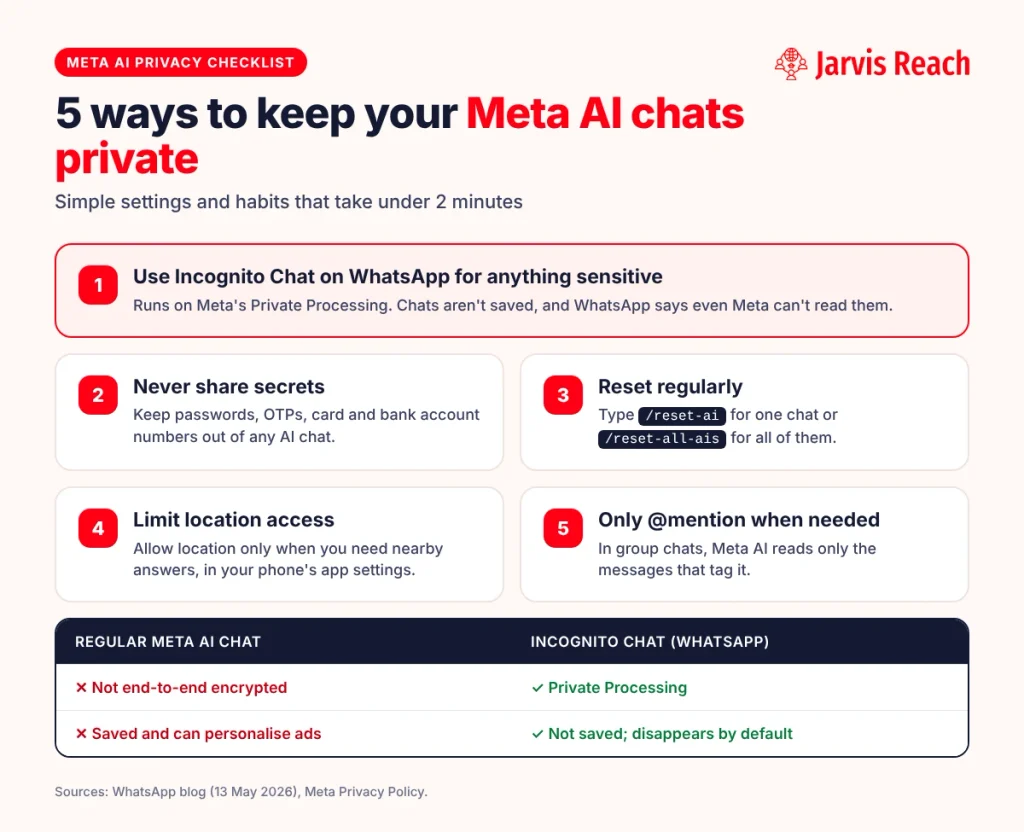
Meta AI chats are not end-to-end encrypted, except Incognito Chat on WhatsApp (see below). As per Meta’s privacy policy, content from your interactions can be used to personalize ads and to improve or develop AI products.
However, it is good practice not to share personal, private or confidential information with Meta AI or any AI assistant.
Delete your history from time to time.
Source: Meta Privacy Policy
How to chat with Meta AI in Incognito mode?
You can have private chats in incognito mode, where your history will not be stored. It is ideal for sensitive conversations, as Meta AI won’t reapply its memory in your later chats.
WhatsApp launched Incognito Chat with Meta AI on 13 May 2026. It runs on Meta’s Private Processing technology: WhatsApp says “no one can read your conversation, not even us”, and messages disappear by default.
On WhatsApp:
1. Open a one-on-one chat with Meta AI.
2. Look for the Incognito icon/toggle at the top of the chat.
3. Tap it – the chat theme will change to a private session.
Will Meta AI keep a record of my location history?
Meta AI can use your location provided that you grant it. However, it is reported to not keep a running timeline of everywhere you have been, like Google Maps.
Source: Meta AI help
Can Meta AI harm me after getting all my information?
Meta AI can’t read your mind; it only acts on what you ask it to do. It may feel like it is reading your mind based on your repeated preferences, but it has no consciousness, intent or feelings to harm you.
As mentioned above, turn off tracking and history, limit its permissions, and use incognito mode to stay in control of your data.
How to remove the Meta AI button?
As per Meta, you can’t fully remove it. The available controls to hide, mute or disable the Meta AI button/circle vary with the version type you are using and the type of Meta platform you are on.
How to reset Meta AI and delete my history?
You can reset your assistant and delete your complete conversation history.
1. Open Meta AI (the blue circle icon).
2. Type /reset-ai to reset one chat, or /reset-all-ais to reset all your Meta AI chats,
3. and send the message.
4. Meta will confirm – then reset.
For group chats: type /reset-all-ais and send the message. The command deletes all the messages – then confirms “Clear the chat from your app?”.
Will Meta AI read my messages even in incognito chat?
No, only you can see the chat. Meta AI and WhatsApp aren’t able to read or access your messages. This applies to WhatsApp’s Incognito Chat, which uses Private Processing. Ordinary Meta AI chats are not end-to-end encrypted.
Top 10 Tips & Tricks for Using Meta AI
Meta AI can do far more than answer simple questions, and a few lesser-known tricks can make it much more useful for writing, learning, shopping, social media, and everyday tasks.
What are the ten things one should know before using Meta AI?
1. Don’t confuse it: ask one prompt at a time; don’t clutter a prompt with too many unrelated things.
2. Follow up naturally: let your follow-up questions be natural, too.
3. Generate images: works like other AI models, and you can also animate images into short videos.
4. Use voice commands: tap the microphone icon like you do on WhatsApp and go hands-free.
5. Summaries: upload all kinds of digital files – Meta AI can extract the data and give you a summary.
6. English tutor: it can do role plays and personas, so you can turn it into your personal English tutor.
7. Improve relevance: give positive feedback whenever you get a good response; it helps Meta improve its answers. To make Meta AI remember your style, tell it directly, for example “Remember that I prefer short replies”.
8. Chat pinning: pin important conversations in WhatsApp (for example, pin your Meta AI chat) for easy access later.
9. Online shopping: Meta AI can help you find products and compare similar ones.
10. Social media: it can draft captions, summarize long conversations over voice, translate content from one language to another, and you can tag your queries with @Meta AI. Basically it helps in reduce some part of manual social media marketing.
Frequently Asked Questions (FAQs) About Meta AI
Meta AI has plenty of useful features, but knowing a few simple tips can help you get better answers, save time, and make the most of it across chats, voice, images, files, and social media.
Meta AI Basics
How does Meta AI work?
It runs on Meta’s Muse Spark model. It reads your text, voice or image, and replies in the chat.
Who owns Meta AI?
Meta Platforms, Inc., the company behind Facebook, Instagram, WhatsApp and Threads.
What can I use Meta AI for?
Messages, captions, images, research, translation, summaries, coding help and questions about what you see through Meta AI glasses.
Does Meta AI use ChatGPT?
No. It uses Meta’s own models: Muse Spark today, and earlier the Llama models.
How to use Meta AI for business?
Businesses use Meta Business AI (Business Agent) to answer customers on WhatsApp, Instagram and Messenger. Meta says it serves more than 1 million businesses a week.
Meta AI on WhatsApp
How do I use Meta AI on WhatsApp?
Tap the blue circle in your chat list, or type @Meta AI in a group. See the step-by-step guide above.
How do I activate Meta AI on WhatsApp?
There’s nothing to switch on. Update WhatsApp, and the Meta AI icon appears where it’s available.
How to use Meta AI in WhatsApp groups?
Type @Meta AI followed by your question. It only reads the message that mentions it.
Why is my WhatsApp not showing the Meta AI button? / Why don’t I see Meta AI on WhatsApp? / Why can’t I see Meta AI on my WhatsApp?
It may not be available in your country or for your account yet, or your app needs updating.
Can Meta AI read my secret WhatsApp chat and group chat?
No. Your personal chats stay end-to-end encrypted. Meta AI only sees messages you send to it or that mention @Meta AI.
Why isn’t my Meta AI responding?
Check your internet connection and update the app. If it still doesn’t respond, type /reset-ai.
Meta AI Image Generation & Editing
How to create images on Meta AI?
Describe the image you want in the Meta AI chat; see the step-by-step guide above.
How to write a prompt for Meta AI images?
Name the subject, setting, style and mood, for example: “a red vintage scooter on a rainy Mumbai street, film-photo style”.
Can Meta AI create natural, photo-like images?
Yes. Add “photorealistic” or “photo style” to your prompt.
Can Meta AI create images in different aspect ratios, such as 1:1?
You can ask for a shape in your prompt, such as “square” or “1:1”. The options vary by app and region.
Can Meta AI edit an existing photo?
Yes. Upload a photo and describe the change you want.
Can Meta AI remove objects from photos?
You can upload a photo and ask Meta AI to edit it, including removing small objects. Results vary, so check the edited image closely.
Can Meta AI change a photo’s background?
Yes. Upload the photo and describe the new background you want.
Can Meta AI create profile pictures?
Yes. Upload your photo and ask for a profile-picture style, such as a professional headshot.
Can Meta AI create stickers?
Yes. On WhatsApp you can create AI stickers by describing the sticker you want.
Can we use Meta AI images for commercial purposes?
Check Meta’s AI terms of service before using generated images commercially.
Meta AI for Writing, Study & Productivity
Can I ask Meta AI to rewrite my post?
Yes. Paste your post and say how you want it changed: shorter, friendlier or more professional.
Can Meta AI help with social media content?
Yes. It drafts captions, post ideas and replies.
Can Meta AI help with coding?
Yes. It can write, explain and fix code.
Can Meta AI search the Internet?
Yes. It can search the web for current information.
Can Meta AI analyze PDFs and documents?
Yes. Upload the file and ask for a summary or specific answers.
Can Meta AI analyze spreadsheets?
It can read uploaded files and answer questions about them. For complex spreadsheets, a dedicated tool such as Gemini in Google Sheets works better.
Can Meta AI understand voice messages?
You can talk to Meta AI by voice. For voice messages from friends, WhatsApp also offers voice message transcripts in its settings.
Can Meta AI translate conversations?
Yes. Ask it to translate a message into the language you need.
Can Meta AI brainstorm my food, snacks, travel and other event ideas?
Yes. Give it your budget, place and number of people for better ideas.
Can it help me plan a surprise?
Yes. It can suggest ideas, timings and messages; just don’t plan it in a group chat the person is in.
Which AI is better for students?
For quick explanations, Meta AI is handy inside WhatsApp. For long research and essays, ChatGPT or Gemini are stronger.
Meta AI vs Other AI Assistants
Is Meta AI better than Google Gemini and ChatGPT?
For quick personal messages and images, yes. For long-form work and research, ChatGPT and Gemini are stronger.
Can Meta AI replace ChatGPT?
For casual daily use, yes. For deep research or long documents, not yet.
Meta AI Privacy & Trust
Will Meta AI store any of my chats or conversations?
Yes, unless you use Incognito Chat. You can delete them with /reset-ai.
How trustworthy is Meta AI?
Its answers are usually reliable for everyday tasks, but check facts that matter and keep sensitive details out of your chats.
Conclusion
Meta AI’s integration into major social media platforms brings a new level of personalized service, going beyond what traditional chatbots have offered. Its ability to adapt to individual needs could transform how users interact with technology in their daily lives.
Meta AI is moving towards being a personal agent that does much more personalized work than a virtual assistant; adding more features can be a real help during their busy schedules.
However, we’ll also have to wait and see what risks it brings in data security, privacy and the exposure of personal information.
Our verdict: for quick messages, captions and images, Meta AI is already the most convenient assistant because it lives in the apps you use every day. Use Incognito Chat for anything sensitive, and turn to ChatGPT or Gemini for long research and professional writing. And if you want AI to work as hard on your sales pipeline as Meta AI does in your chats, Jarvis Reach helps you find verified B2B contacts and run automated email outreach, all in one place.